
FlexDoc.XYZ - Data Processing Features
- XML file data sources
- Java application data sources
- Single document from multiple data sources
- Creating framed HTML documentation
- Inserting graphic images
- Creating hyperlinks
- Supported data types
- FlexQuery-expressions
- Retrieving elements/attributes by Location Paths
- Iterations by elements, attributes, attribute values
- Collecting elements by Location Rules
- Other methods of collecting elements
- Sorting
XML file data sources
Ability to use any XML files as a data sources, retrieve any character or numeric data from them and generate by such data any kind of formatted/hypertext output documents.This features is available in FlexDoc/XML.
Java application data sources
Using special drivers written with FlexDoc API, it is also possible to connect to any other non-XML data sources provided by a Java application.Such data sources (called Data Source Models (or DSMs) and drivers to them – DSM Drivers) can be processed in the same way as XML-files and allow to generate by them any kind of documentation.
See FlexDoc/Javadoc and FlexDoc/Together as rich examples of working with such application-provided data sources.
Single document from multiple data sources
By calling from one template another templates (subtemplates) it is possible to mix data from the different data sources and to generate by them a single documentation files.The involved data sources can be of any possible nature, both XML and non-XML types.
Creating framed HTML documentation
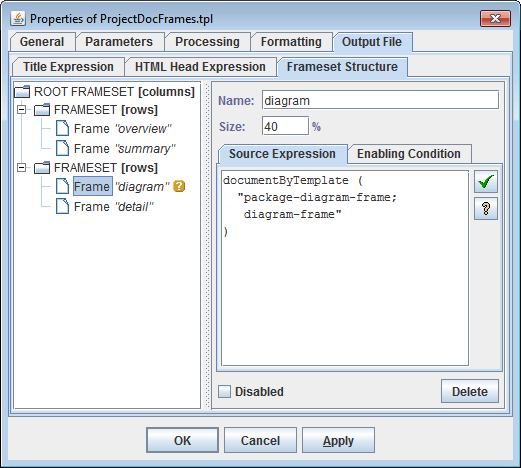
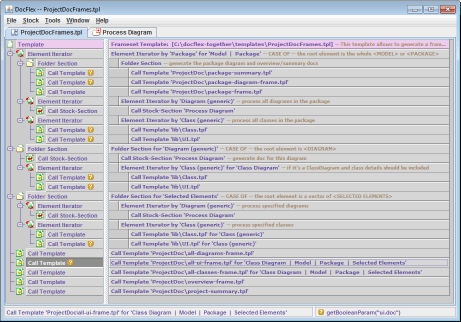
Using subtemplates allows to generate from one or more data sources a documentation that consists of many separate HTML files interconnected by a common network of hyperlinks and displayed in separate frame windows.This is achieved by creating special frameset templates. Each frameset template consists of two major parts: the definition of a frameset structure and the template body. The frameset structure is defined in the form of a tree as shown on the following screenshot:
Inserting graphic images (both static and provided by Java application)
FlexDoc.XYZ supports inserting graphic images into the generated documentation.The images can be either taken from the existing graphics files (via URLs, file pathnames or Java resource names specified in the templates) – static images, or generated dynamically by a Java application and, then, provided to the FlexDoc Generator by a custom written DSM Driver (see FlexDoc API for more details).
The supported graphics formats include JPEG, GIF, PNG, and WMF. Depending on the selected output format and the generator's settings, the images can be either inserted as the references to the graphics files stored externally near the generated documents (HTML, RTF) or embedded directly in the document files (RTF). See Image Formatting for more details.
For more information about image support, see also Image Control in Template Components documentation.
Creating hyperlinks
FlexDoc allows to generate hypertext links between any parts of the generated documentation as well as to the external URLs.The internal links are generated using the special hyperlink source- and target-anchors defined within the properties of template components. Each anchor definition contains specifications for generating the anchor keys.
The following screenshot shows defining two hyperlink source anchors by a Data Control component (the two are because this control generates a text hyperlink which loads two frame windows at once; see description below):
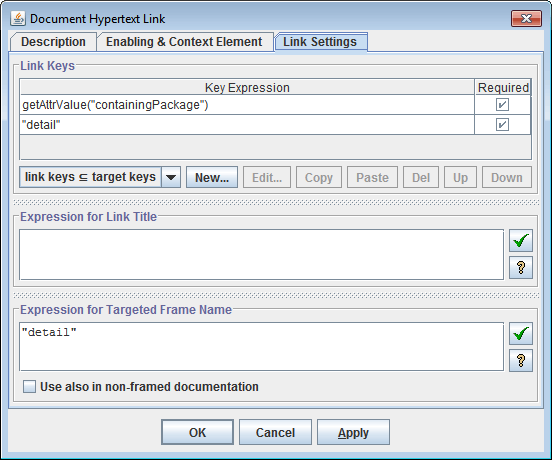
And here is how the particular source anchor defined: The following two screenshot show defining a hyperlink target anchor (there may be also several of them; but in that case, this is only for convenience purpose):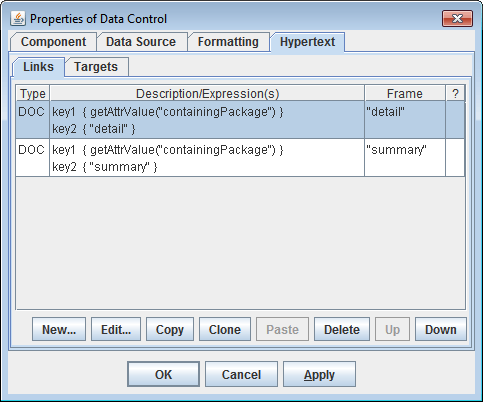
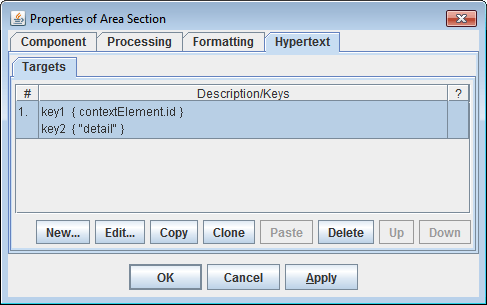
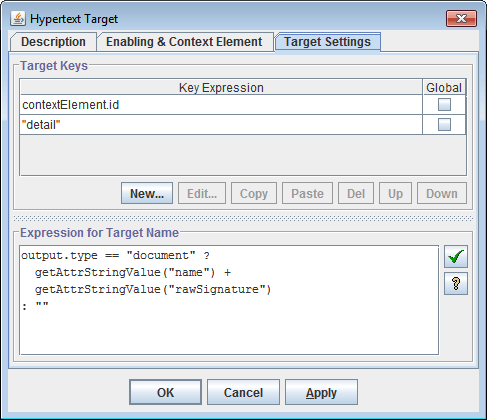
- During the first (estimation) phase, by the anchor definitions specified in the templates, the possible anchor positions in the output documents are produced, together with their anchor keys. These positions are stored in a single pool for all generated documents.
- On the second (generation) phase, when the real output is generated, by each anchor having a match in the anchor pool (i.e. another one of the opposite source/target type and with the same keys), the real hyperlink anchor (source or target) is produced and inserted in the output.
Targeting frame windows
A hyperlink source definition may include a name of the targeted frame window (see screenshot above).It is also possibility to define by the same template component several hyperlink sources assigned with different document destinations and targeted to different frame windows (see screenshot above). This allows to load from a generated hyperlink several frame windows at once with the different documents.
Hyperlinks within images (imagemaps)
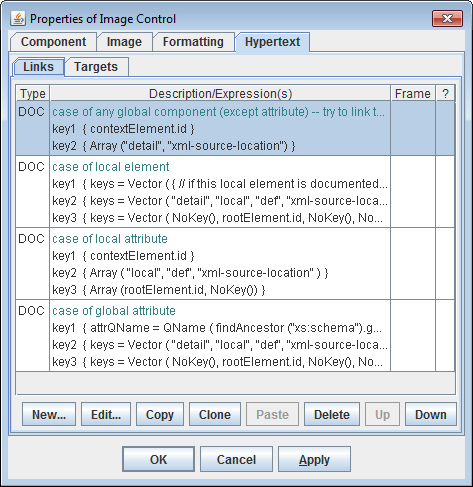
For images provided by a Java application (via DSM Drivers), it is possible to generate multiple hyperlinks within a single image. To do this, the DSM Driver should also provide a hypertext imagemap for the image.The following screenshot shows how various hyperlinks are defined for a complex diagram image (specified in the diagram.tpl template included in FlexDoc/XML | XSDDoc):
Supported data types
FlexDoc recognizes the following base data types of XML-element/attribute values:stringnumberbooleanobject
The 'object' data type represents a reference to any Java object and is useful
when the data source is provided by a Java applications
and represents its internal data.
In addition, FlexDoc recognizes attributes with element identifier data types:
IDIDREF
ID attributes are used to distinguish particular elements.
The IDREF attributes can be used to obtain the referenced elements
as well as for generation of hyperlinks.
Besides this, all values can be arrays of the above types.
FlexQuery-expressions
FlexQuery-expressions are small scripts with Java-based syntax widely used in FlexDoc templates to specify all kinds of dynamically computed settings (such as dynamic properties of template components, filter conditions and so on).The current FlexQuery implementation supports the following features:
- Each script may consist of any number of statements delimited with semicolons. The last statement should be an expression returning the result value of the whole script. The intermediate statements currently can be only assignments either to local variables (which can be used further within the following statements) or to generator properties.
-
The supported operators within the expressions are the following:
Arithmetical +, -, *, /, % String concatenation + Number comparison ==, !=, <, <=, >, >= String and other types comparison ==, != Logical !, &&, || Conditional ?: Function call func (args) Property access -> or . -
Each expression may return a value of any Java class type.
However, only values of
string,numberandbooleantypes (which are equivalent of Javajava.lang.String,java.lang.Numberandjava.lang.Booleanclasses) can be processed by expression operators. Values of other types can be only passed as function parameters. - More than 200 general-purpose built-in utility functions are now available within the FlexQuery-expressions.
-
Any custom implemented DSM Driver
may also register its own utility functions to allow access to some specific features of
the underlying DSM.
For instance, FlexDoc/Together provides more than 20 additional utility functions which allow to use the functionality specific for Together OpenAPI interfaces.
- Within FlexQuery-expressions, it is possible to access the template parameters as well as various generator variables organized in the form of hierarchy of objects and properties of Generator Object Model (similar to Document Object Model in Dynamic HTML).
Retrieving elements/attributes by Location Paths
Location Paths are special expressions used in FlexDoc templates to specify searching of elements or attributes. Location Paths applied in FlexDoc are similar to those in XPath and looks like the following:-
Step1 / Step2 / ... / StepN
-
axis :: ETs [filter]
axis is the step's axis;
ETs is a list of matching element types (delimited with '|');
filter is a boolean FlexQuery-expression
StepN, in addition, may assume the form:
-
@name
name is the name of an attribute.
However, there are several important differences between Location Paths used in FlexDoc and those used in XPath:
-
The axes borrowed from XPath are only the following:
childselfchild-or-selfdescendantdescendant-or-selfattribute(only in the form:@name)
-
A new axis
linkwas introduced, which has a form:name^
where
nameis the name of an attribute whose type should be eitherIDREForIDREF[](an arrays ofIDREF). This axis selects all those elements of the XML document (or DSM) whose identifiers are listed in the attribute's value. -
XPath predicates are replaced with a
filter, which can be any boolean FlexQuery-expression.
For more information see documentation: Element Iterator | Location Paths.
Iterations by elements, attributes, attribute values
The general data processing scheme employed in FlexDoc consists in organizing nested iterations by sets of elements collected from the data source. Such iterations are specified using Element Iterator template components.In addition to elements, it is possible to iterate by a set of attributes of a certain element or by multiple values of a certain attribute. Organizing iterations by sets of attributes can be useful when the same processing should be repeated for each attribute from the set. See Attribute Iterator documentation for more details.
Collecting elements by Location Rules
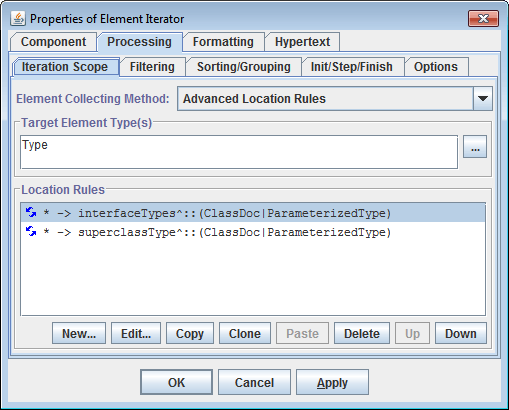
This is the primary method used in FlexDoc to specify collecting elements for iterations. According to it, an Element Iterator is specified with a set of Location Rules.Each Location Rule has the following form:
-
Matching Element Types → Location Path
Matching Element Types.
Then, the Location Path is interpreted against the
context element and a set of new elements is produced.
Traversing element references
Unlike techniques available in XSL Transformations, Location Rules allow to collect elements not only within a subtree attached to the context element but also to involve in the search the elements accessible via reference attributes (i.e. those withIDREF or IDREFS types).
This is achieved by using link-axes (introduced in FlexDoc)
together with specifying some Location Rules as recursive (i.e. repeatable an undefined number of times).
For more details, see documentation:
Element Iterator | Recursive Location Rules.
The following screenshot shows specifying the collecting elements by Location Rules in an Element Iterator:
Other methods of collecting elements
Besides Location Rules, FlexDoc.XYZ supports two additional alternative methods for collecting iterated elements:-
The set of elements is produced as a sequence of connected elements according to two
FlexQuery-expressions:
- an expression calculating the first element (basing on the current context element)
- an expression producing all subsequent elements each next from the previous one
- This allows to organize iterations by an arbitrary set of elements provided by an external Java-class. The class should be written with the FlexDoc API.
For more information, see documentation: Element Iterator | Specifying Element Iteration Scope.
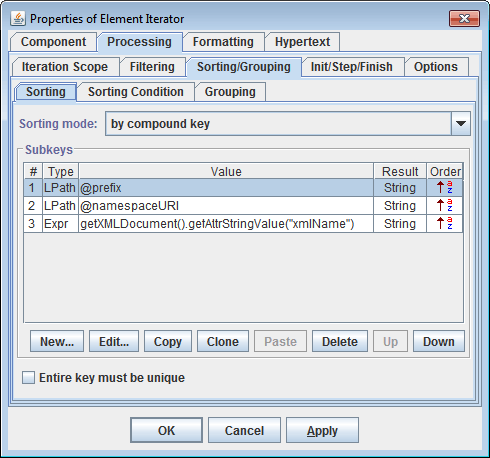
Sorting
The information placed in reports can be presented in a particular sorting order. This is achieved by specifying the sorting order for the iterated elements, attributes or the attribute values:- by the element value (regarding its type)
- by the value of a specified element attribute (regarding its type)
-
by a specified compound key which may consist of an array of subkeys generated
separately for an element. The subkeys may have different data types and different
ordering (ascending or descending). Two compound keys are compared by
consecutive comparing their constituent subkeys regarding their data types and ordering.
Defining sorting by a compound key:
- by name
- by value (regarding its type)
- by an arbitrary order defined in the Attribute Iterator.
For more information, see documentation: Element Iterator | Sorting and Template Components | Attribute Iterator.