
FlexDoc/XML - XMLSpy Integration
- Overview
- Getting Started
- Settings Detail
- Generator Setups
- How Integration Works
- Problems/Issues of XMLSpy Versions
- The old and new XMLSpy Java APIs
- Displacement of imagemap coordinates
- Visualization of identity constraints
- Problems with opening some XML schemas
- Missing hyperlinks to enclosing types
- Missing hyperlinks to some local attributes
- Missing hyperlinks to all attributes
- Missing attributes on diagrams
- Missing diagrams of redefined components
1. Overview
Altova XMLSpy is a well-known XML editor and IDE that, besides many other things, includes a graphical XML Schema editor representing some XML schema components (mostly those defining complex content models) in the form of graphical diagrams, which can be edited.It should be noted that probably all modern XML editors currently support such a feature. However, the content model diagrams generated by XMLSpy look particularly elaborated and neat.
Along with the XML schema editor, XMLSpy includes an XML schema documentation generator able to generate rather poor (basically single-file) documentation, however, with all those beautiful diagrams included (along with the diagram hyperlinks).
Another important functionality provided by XMLSpy is an open Java API, which allows any Java application to call from itself some XMLSpy functionality, essentially turning XMLSpy into a kind of DLL (Dynamically Linked Library).
Those two features allowed us to integrate FlexDoc/XML with XMLSpy so as to insert automatically graphic diagrams generated by XMLSpy into the XML schema / WSDL documentation generated by FlexDoc/XML XSDDoc / FlexDoc/XML WSDLDoc (with the full support of diagram hyperlinks). This, in effect, creates a new XML Schema / WSDL Documentation Generator with diagramming capabilities no other single product is offering now!
Click on the following screenshot to see a sample documentation generated with it:

Key Features
-
Supported XMLSpy versions: 2004-2020 (or later)
- Via both the old and new XMLSpy Java APIs
The integration has been tested and works correctly with all XMLSpy versions 2004-2020. Since 2013 we have encountered no particular changes in XMLSpy that needed to be specifically processed in the integration (both Java-hardcoded and in templates). That is, concerning our integration, XMLSpy works absolutely the same. We expect that will hold for some future as well (the reason is that both XSD language and XMLSpy are quite settled things now). -
Possibility to run XMLSpy from FlexDoc/XML templates:
- Launching XMLSpy as a parallel system application
- Using it as a dynamically linked library to perform certain operations
- Quitting XMLSpy, when it is no longer needed (without stopping the template application)
- Forcing XMLSpy to open specified XML schemas and to generate the content model diagrams for all their components (along with the hypertext image maps).
- Associating the diagrams (and hyperlink image maps) generated by XMLSpy with the DSM elements representing the XML schema components in templates and making them available (via Image Control) to be inserted in the output documentation generated by FlexDoc/XML.
-
Automatic insertion of XSD component diagrams produced by XMLSpy into the XML schema
documentation generated by FlexDoc/XML XSDDoc.
The diagrams can be generated in the following formats:
- PNG
- EMF (only since XMLSpy 2009)
- Full support of diagram hyperlinks (in HTML output).
- Possibility to run the unified FlexDoc/XML+XMLSpy template-driven documentation generators from both Apache Ant and Maven.
Technical Requirements
-
Altova XMLSpy, versions 2004-2020 (or later),
“Professional” or “Enterprise” edition.
Basically, what is needed for the integration to work is that your XMLSpy edition supports:
- XMLSpy Java API
- “XML Schema documentation” feature
- Java version 9 (or later) installed on your system.
- A computer with 2 GB RAM (or more)
Licensing / Processing Modes
Being a complex piece of software, which took great efforts to develop, the XMLSpy Integration requires a separate licensing. Depending on your license, the integration may work in one of two different modes: full or trial, as described in the following table:
| Processing | Description |
|---|---|
| Full Mode |
The Full Mode is activated in the presence of a Full License for
“FlexDoc/XML XMLSpy Integration”.
This mode allows you to use the integration without any limitations. Once it is enabled, you may think about the integration as just another part of FlexDoc/XML executables. Anything else will depend on your other licenses. |
| Trial Mode |
The Trial Mode is activated in the presence of a Trial License
for “FlexDoc/XML XMLSpy Integration”.
In this mode, the integration will work the same as in the full mode.
However, no matter what your other licenses are the following limitations will be enforced:
|
See Also:
2. Getting Started
Since XMLSpy Integration is closely connected with the FlexDoc/XML core, all Java classes implementing it are included in the general FlexDoc/XML Java library:flexdoc-xml.jar.
However, in order to use it, you need to have a license for “FlexDoc/XML XMLSpy Integration” and to specify some additional settings.
Obtain a License
The XMLSpy Integration requires a separate license, which you should receive by e-mail.
The license comes as a single 'flexdoc-xml-xmlspy.license' file
or it may be included in a combined 'flexdoc-xml.license' file (along with other licenses).
Either of those files should be saved in the 'lib' directory of your FlexDoc/XML installation,
where the license is searched by default (near 'flexdoc-xml.jar' file).
It is also possible to specify any other location of your license file directly on the generator or template designer command line using -license option.
Running on Windows
Here is a quick instruction how to run FlexDoc/XML+XMLSpy on Windows (without much investigation):- Download the FlexDoc/XML archive and unpack it.
-
Save the
flexdoc-xml.licensefile (containing the “XMLSpy Integration” license) in the directory:{flexdoc-xml}/lib -
Now, go to the directory:
{flexdoc-xml}/integrations/XMLSpyEdit
generator.batfound in that directory, in these lines:::---------------------------------------------------------------------- :: Specify the location of JRE/JDK 9 (or later) here ::---------------------------------------------------------------------- set JAVA_HOME=C:\Program Files\Java\jdk-14 ::---------------------------------------------------------------------- :: Specify the location of XMLSpy home directory ::---------------------------------------------------------------------- set XMLSPY_HOME=C:\Program Files\Altova\XMLSpy2020
-
Run the
generator.bat. The Generator Dialog should appear: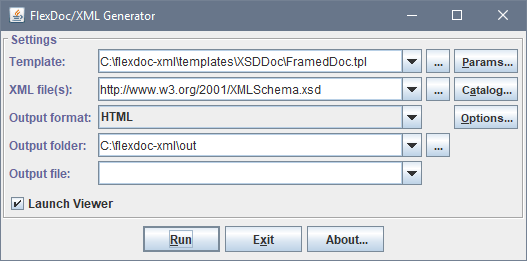
Now, you can test the generation of XML schema documentation with XMLSpy diagrams included.
Check that everything is specified as shown on the screenshot. Then, click the «Run» button. When the generation finishes, the result documentation should be open automatically in the default HTML browser.
Windows 64-bit
After you have setup everything as described above, you may still be unable to run FlexDoc/XML+XMLSpy. Instead, you may get an error saying that some XMLSpy DLL cannot be found.The most likely cause is that your operating system is a 64-bit Windows (e.g. Windows 10 64-bit), but either XMLSpy or Java installed on it is 32-bit. (That's because 32-bit Java doesn't know how to run a 64-bit DLL and vice versa).
When your computer runs Windows 64-bit, please make sure that both XMLSpy 64-bit and Java 64-bit are installed on it!
Otherwise, the integration won't work!
3. Settings Detail
This section describes all primary settings that are required (or may be needed) to setup and run the XMLSpy Integration. Once you know those settings, you will be able to configure the combined FlexDoc/XML+XMLSpy documentation generator for any particular environment you need (for examples, see Generator Setups).XMLSpy Integration Plugin
XMLSpy Integration is one of the diagramming plugins of FlexDoc/XML, which means it is a Java-service implementation of Element Image Provider. That is a separate Java module packed in the jar-file:-
{flexdoc-xml}/lib/flexdoc-xml-xmlspy.jar
{flexdoc-xml} is FlexDoc/XML installation directory. That file must be included in the Java module path
in order to run FlexDoc/XML+XMLSpy.
Besides that, the service name itself must be specified on the Java command line (that runs generator or template designer) using -m option as follows:
-
-m:IMAGE_PROVIDER=XMLSpy
XMLSpy Version
Early XMLSpy versions (until 2013) were slightly different from each other in regard to generation of XSD diagrams and Java API provided for that (see Problems/Issues of XMLSpy Versions). That difference had to be specifically processed in the integration (by adjusting various workarounds) according to particular XMLSpy version. Since XMLSpy Java API doesn't provide any version number information, it needs to be specified manually as the integration parameter with -m option on the Java command line, e.g.:-
-m:XMLSPY_VERSION=2011
To avoid endlessly incrementing the last supported XMLSpy version number (and, therefore, confusing users to think that without that the integration
won't work with yet another XMLSpy release), we have introduced a mnemonic version number "2013+", which cover anything released since 2013.
That is the default value of the 'XMLSPY_VERSION' parameter.
Of course, if in some future we find that XMLSpy has changed in respect to our integration, we will introduce a yet another such a mnemonic / bracket.
If your XMLSpy version is equal or higher than 2013, you don't need to specify anything about it, or you can specify just the default value:-
-m:XMLSPY_VERSION=2013+
-m:XMLSPY_VERSION option.
XMLSpy API Java Class Path
These are the jar-files supplied by Altova, which allow a Java application to run XMLSpy.Currently, Altova maintains two parallel versions of XMLSpy Java API (see The old and new XMLSpy Java APIs):
-
The early API, which existed all the time since the very start,
is implemented by
'XMLSpyInterface.jar'file found in XMLSpy installation directory, e.g.:-
C:\Program Files\Altova\XMLSpy2020\XMLSpyInterface.jar
-
-
Since XMLSpy 2012, there is another completely different API. It is implemented by two jar-files:
'XMLSpyAPI.jar'and'AltovaAutomation.jar'found in'JavaAPI'subdirectory of the XMLSpy installation directory, e.g.:-
C:\Program Files\Altova\XMLSpy2020\JavaAPI\
-
-
-m:IMAGE_PROVIDER_CLASSPATH="%XMLSPY%\XMLSpyInterface.jar;%XMLSPY%\JavaAPI\XMLSpyAPI.jar; %XMLSPY%\JavaAPI\AltovaAutomation.jar"
'XMLSPY' is expanded to the XMLSpy installation directory, e.g.:
-
set XMLSPY=C:\Program Files\Altova\XMLSpy2020
The whole classpath is enclosed in double quotes because 'Program Files' contains a space.
Without quotes, such a classpath will be broken by the spaces and interpreted as several separate command line arguments.
XMLSpy API Library Path
XMLSpy itself is a Windows application, so all those jar-files eventually call from themselves some Windows DLLs, which are loaded by the JVM and must be found by it.Here again the situation is different for different XMLSpy API versions (see The old and new XMLSpy Java APIs):
-
In the case of early XMLSpy API, the bridge DLL is
'XmlSpyLib.dll'located in Windows'system32'directory, e.g.:-
C:\WINDOWS\system32\XmlSpyLib.dll
-
-
In the case of new XMLSpy API, the bridge DLL is
'AltovaAutomation.dll'located in'JavaAPI'subdirectory of the XMLSpy installation directory, e.g.:-
C:\Program Files\Altova\XMLSpy2020\JavaAPI\AltovaAutomation.dll
-
-m:XMLSPY_LIBPATH="C:\Program Files\Altova\XMLSpy2020\JavaAPI"
- This setting is needed to let Java know where to find the Windows DLL required for XMLSpy Java API.
- The double quotes are necessary to prevent breaking the option by spaces in XMLSpy home pathname.
-
Related Template Parameters
Besides the Java command-line settings required to setup the integration as a whole, there are other integration settings relevant only to a particular documentation generator (implemented as a template set). Those settings are exposed as template parameters. See: Using them, you can adjust other things as well as to specify how to overcome certain problems of particular XMLSpy versions.4. Generator Setups
This section provides full examples of how to setup a combined FlexDoc/XML+XMLSpy documentation generator for some important cases.Windows Batch File
Suppose, you want to generate a framed HTML documentation (with XMLSpy diagrams) using XSDDoc | Templates | FramedDoc.tpl template by the XML schema located at the URL: http://www.w3.org/2001/XMLSchema.xsd.Here is a simple Windows batch file that would launch such a generation (with the red are highlighted settings related to the XMLSpy Integration):
xsddoc.bat
set |
FDH=C:\flexdoc-xml |
||
set |
|
||
| |||
set |
XMLSPY=C:\Program Files\Altova\XMLSpy2020 |
||
set |
XMLSPY_VERSION=2013+ |
||
set |
|
||
set |
|
||
| |||
rem |
The Java option highlighted with the red is needed to allow changing Java system property "java.library.path" from Java code
|
||
set |
|
||
| |||
java |
%JAVA_OPTIONS%
--module-path "%MODULE_PATH%"
--module flexdoc.xml/xyz.flexdoc.xml.Generator
|
||
Running with Apache Ant
You can easily integrate FlexDoc/XML+XMLSpy with Apache Ant automated build system.
As an example, here is an ANT build.xml file doing the same as the Windows batch file described above.
build.xml
XMLSpy library path (the location of Windows DLLs that implement
the bridge between XMLSpy Java API v2012 and XMLSpy.exe)
-->
Execute the FlexDoc/XML generator.
-->
All options you want to pass to the FlexDoc/XML Generator should be specified
here with the <arg> elements in the same order as on the command line.
-->
Specify one or many data source XML files to be processed
by the specified template. (Both local pathnames and URLs
are allowed.)
In this example, it is an XML schema to be documented.
-->
To run that build.xml file, you can use a Windows batch file specified like the following:
set ANT_HOME=C:\apache-ant
set PATH=%ANT_HOME%\bin;%PATH%
set JAVA_HOME=C:\Program Files\Java\jdk-14
call %ANT_HOME%\bin\ant.bat xsddoc
build.xml file!
Running with Apache Maven
How to run FlexDoc/XML with Maven is basically explained on this page: FlexDoc/XML | Integrations | Apache Maven.The following project POM file shows how to configure the FlexDoc/XML Maven Plugin to generate a framed HTML XML schema documentation by the XML schema located at http://www.w3.org/2001/XMLSchema.xsd using FlexDoc/XML | XSDDoc | FramedDoc.tpl + XMLSpy Integration, so that the result doc would appear on the “Project Reports” page of a Maven-generated project site.
pom.xml
XMLSpy library path (the location of Windows DLLs that implement
the bridge between XMLSpy Java API v2012 and XMLSpy.exe)
-->
Reporting section.
All reports for "Project Reports" page of the Maven-generated site
should be specified here.
-->
Specify Element Image Provider class path.
Since both FlexDoc/XML Maven plugin and FlexDoc/XML called from it are executed in non-modular mode,
any special Java classes necessary to run the Element Image Provider must be specified here!
-->
Specify one or many data source XML files to be processed
by the specified template. (Both local pathnames and URLs
are allowed.)
In this example, it is the XML schema to be documented.
-->
Specify the output directory name.
The plugin will convert it into the absolute pathname of the output directory,
which is passed further both to Maven and to FlexDoc/XML Generator (via -d option).
-->
To run that pom.xml file, you can use a Windows batch file specified like the following:
set JAVA_HOME=C:\Program Files\Java\jdk-14
set M2_HOME=C:\apache-maven
set MAVEN_OPTS=-Xms512m -Xmx1024m
call %M2_HOME%\bin\mvn.bat site:site
pom.xml file!
5. How Integration Works
It is not an XMLSpy plugin. (That would be actually impossible because XMLSpy itself is not based on Java.) Rather, the integration allows FlexDoc/XML to launch an instance of XMLSpy as a separate parallel process and call some its functionality, essentially turning XMLSpy into a DLL (Dynamically Linked Library).Such usage in fact is supported by Altova itself, who includes in XMLSpy a special Java API.
Running XMLSpy from templates
The integration exposes some of the XMLSpy Java API functionality to templates via several FlexQuery functions, which allow a template to:- Launch XMLSpy (start a session to communicate with it).
- Process with XMLSpy a specified XSD file, that is force XMLSpy to open that schema and generate diagrams (along with imagemaps) for its components to be further processed by the integration.
- Shut down the XMLSpy.
How diagrams and imagemaps are obtained
Unfortunately, XMLSpy Java API currently lacks a direct support of the generation of content model diagrams (and imagemaps to them) suitable for documentation. But XMLSpy does produce all those things by itself when it generates its own XML schema docs. This opens a way to work around that problem. Once XMLSpy is made to generate its own documentation, further it is possible to extract automatically from that documentation any diagrams and imagemaps we need. Fortunately, the XMLSpy Java API does allow all this!So, the integration actually works by calling XMLSpy to generate its own (reduced) documentation for every initially specified XML schema file. Further, that intermediate documentation is used by FlexDoc/XML (the integration bridge) to obtain the diagram images and imagemaps created by XMLSpy so as to use them in the documentation output generated by XSDDoc.
All temporary files produced by XMLSpy are stored in the directory
-
{documentation_files}/xmlspy
'{documentation_files}' is either the main output directory (specified to the FlexDoc generator)
or the directory associated with the main output file.
For each initially specified XML schema to be documented, FlexDoc/XML calls XMLSpy to generate its own most simplified (however with diagrams) documentation.
That documentation is stored in a separate subdirectory (within '{documentation_files}/xmlspy') under the name derived from the XML schema file name,
for example:
-
{documentation_files}/xmlspy/schema-for-xslt20_xsd
'index.html' file and a number of diagram image files (like 'index_p23.png').
Further, FlexDoc parses the index.html produced by XMLSpy and associates the diagram images (and hypertext maps to them) generated by XMLSpy
with the corresponding schema components documented by XSDDoc templates. To do so, FlexDoc needs to know precisely what the XMLSpy HTML output file
may contain and how this should be treated. That, in turn, varies with the XMLSpy versions. However, actually only a few specific things are different.
Basically, everything comes down to which extra XML schema features the XMLSpy's own documentation generator now supports.
But, the integration cannot know such things by itself. So, it needs to be told about this via template parameters.
Those template parameters that hint the integration how the XMLSpy output should be parsed and interpreted are found in the “Diagramming | XMLSpy Integration | Workarounds” parameter group. But, in most cases you won't need to specify them directly. Their default values are derived from the XMLSpy version number, which is specified in “Diagramming | XMLSpy Integration | XMLSpy Version” parameter. The possibility to change the “Workarounds” parameters is provided because some intermediate XMLSpy versions (releases) may already support certain new extra features, but yet not all found in the next full version.
Once, XSDDoc finishes, the original XMLSpy documentation is not needed any longer and can be deleted. This is controlled by the parameter: “Diagramming | XMLSpy Integration | Delete Temporary Docs”.
How diagrams get into FlexDoc/XML output
Having XMLSpy generate the diagrams is not enough. Further, the diagrams need to be inserted into the output generated with templates. Here is how it is done.FlexDoc/XML templates operate with abstract data entities called DSM elements and DSM attributes, on which everything contained in XML files is mapped. That mapping is maintained by a special module called XML DSM driver. Each DSM element may have a certain graphic representation called element image, which is provided by a special extension of the DSM driver called Element Image Provider. Element images can be easily operated in templates using Image Controls.
Once the diagrams have been generated by XMLSpy, the integration associates them (as well as imagemap hyperlinks) with the DSM elements representing corresponding XML schema components. Further, a special Element Image Provider implemented within the integration treats each diagram as an element image of the DSM element associated with the XML schema components depicted on that diagram. In that way, the diagrams become accessible via Image Controls in templates, which makes possible to easily program their insertion in the output generated by FlexDoc/XML.
6. Problems/Issues of XMLSpy Versions
However, in the process, we discovered a number of problems/issues specific to all or particular XMLSpy versions, which concern the generation of content model diagrams, hyperlinks from them (used in XML schema documentation) and other things.
Some of those issues we were able to work around completely on the programming level. Some could be fixed programmatically too, however may need special attention from the user because they could not work properly on some XMLSpy versions. Such workarounds are controlled via template parameters. Other problems could be fixed by the users themselves via XMLSpy settings. At last, certain issues are either not supported features or just bugs waiting for Altova to fix them (they may be already supported/fixed since some later XMLSpy version).
Below we discuss all such problems/issues that may need your special attention or are good to be aware about (as they might be fixed in some later or future XMLSpy versions).
The old and new XMLSpy Java APIs
XMLSpy is a Windows native application. However, it does allow Java programs to communicate with itself via a special XMLSpy Java API. That API is implemented in the form of some Java classes (packed in one or several JAR-files) that are backed by some Windows DLL.-
The old API
That API existed all the time. It is implemented by two files:
-
  C:\Program Files\Altova\XMLSpy\XMLSpyInterface.jar

  C:\Windows\system32\XmlSpyLib.dll
-
-
The new API
It appeared since XMLSpy 2012 and is implemented by the files found in the directory:
-
C:\Program Files\Altova\XMLSpy\JavaAPI\
-
  XMLSpyAPI.jar

  AltovaAutomation.jar

  AltovaAutomation.dll
Although, we don't know why Altova created another Java API for XMLSpy, it is likely that the new API will be given a priority in the next XMLSpy version. So, if something doesn't work with some future XMLSpy version (since 2012), you may try to switch to this API.
-
This is controlled by a special template parameter. See: FlexDoc/XML | XSDDoc | Parameters | Diagramming | XMLSpy Integration | Workarounds | XMLSpy API. It allows you to select the XMLSpy API by yourself. By default, it is set to the new API.
Displacement of imagemap coordinates
For all XMLSpy versions known to us, all rectangle areas contained in the hypertext imagemaps associated with the content model diagrams generated by XMLSpy are shifted slightly to the top and left, which makes every clickable area to appear somewhat displaced from where it should be.
We have found no rational purpose behind this and assume that it is simply a bug.
Therefore, we programmed a correction by adding (+10,+5) to every (x,y) coordinate found in the imagemaps.
Now, this works fine. But since it is likely a bug in XMLSpy, it may be fixed some time later. So, our correction would actually produce a distortion by itself. In that case, you can always disable such corrections using “Diagramming | XMLSpy Integration | Fix Imagemap Coordinates” parameter found in FlexDoc/XML XSDDoc templates.
Visualization of identity constraints
Since the version 2009, XMLSpy is able to visualize the schema-wide identity constraints (IDC) in component diagrams.Unfortunately, this new feature, probably useful by itself, may also cause a problem. On some XML schemas (for instance, http://www.w3.org/2001/XMLSchema.xsd), the generation of IDC visualizations may take great a lot of time, in fact many times more than without them! We anticipate that for some big XML schemas, when that feature is enabled, it may render XMLSpy almost useless for the purpose of XML schema documentation generation. Fortunately, this may be disabled!
So, if you find that FlexDoc/XML XSDDoc integrated with XMLSpy works very slowly, do the following:
- Start XMLSpy IDE.
- Open any XML schema with it.
- Find on the toolbar the “IDC” button (it has “Visualize identity constraints” tooltip) and turn it off.
- Then, you may quit XMLSpy.
Problems with opening some XML schemas
XMLSpy 2007 seems to have problems with opening some quite perfect XML schemas.For instance, when opening the XML schema located by URL http://www.w3.org/2001/XMLSchema.xsd, XMLSpy reported some "errors" found in that schema and popped up message dialogs about this.
When we tried to run XSDDoc for that XML schema with the XMLSpy Integration enabled, XMLSpy either wasn't able to generate its own documentation by it or a system error (e.g. "XMLSpy has encountered a problem and needs to be closed...") was reported.
It must be said, however, that such strange behaviour was rather rare. Most XML schemas we tried were processed correctly.
Since XMLSpy 2008, such problems do not appear any longer.
Missing hyperlinks to enclosing types
Yellow panels that may appear on the diagrams generated by XMLSpy are meant to represent global complexType components, whose content models are inherited by the given component depicted on the diagram. See, for example, on this screenshot (click to view HTML):

That happens because XMLSpy does not generate a proper hyperlink for the enclosing type. However, it tries... The diagram imagemap does include a hyperlink for each complexType component represented by the yellow panels. The problem is that the imagemap shape specified for such a hyperlink is always a rectangle collapsed to zero size (one or both its sides are always zero!), instead of being exactly the rectangle covering the panel. This, of course, is a bug, which is even impossible to fix from outside, because one would need to know what exactly is shown on the diagram.
Currently, this problem shows up in all versions of XMLSpy (including the latest XMLSpy 2014). So, we have no choice but to wait for Altova to fix it...
Missing hyperlinks to some local attributes
This problem occurs in XMLSpy 2006-2007.Although these versions of XMLSpy depict all local attributes on the diagrams, those local attributes that are defined within global attribute groups will have no hyperlinks to the corresponding documentation.
This happens because XMLSpy does not document separately any attributes defined within attribute groups. Although diagram hyperlinks are generated for such attributes, those hyperlinks actually lead to nowhere. So, they cannot be associated with any pieces of documentation and used by the integration.
This apparent bug has been fixed since XMLSpy 2008.
Missing hyperlinks to all attributes
Only since the version 2005, XMLSpy started to show all attributes (both global and local ones) on the diagrams. However, if you use XMLSpy 2005, none of the attributes will be hyperlinked to the corresponding documentation.This is because XMLSpy 2005 does not document separately any attributes and no diagram hyperlinks for them are generated. It is not a bug, but rather a missing feature. Only since XMLSpy 2008 everything is OK with the attributes.
Missing attributes on diagrams
XMLSpy 2004 does not show attributes on the content model diagrams.Use XMLSpy 2008 (or later) to have all attributes both shown on diagrams and properly hyperlinked to the corresponding documentation.
Missing diagrams of redefined components
Although all tested XMLSpy versions process redefinitions of XML schema components (those specified within<xs:redefine> elements),
XMLSpy 2006 and early versions do not document the original components (those being redefined).
So, if you use XMLSpy 2006, only component redefinitions will have their diagrams!
Use XMLSpy 2007 (or later) to have the diagrams generated for both the original components and their redefinitions.