
FlexDoc/XML - Designing Templates
- How to Create a Template?
- Defining XML Type
- Running Template Designer
1. How to Create a Template?
Here are your steps:
-
You should start from creating an XML schema
that describes your XML files (that is, with which all your XML files must conform.
Instead of the XML schema, you may also create a DTD file, which will serve the same role. However, XML schema is a better and more modern alternative with a lot more capabilities.)Why is XML schema needed?
Because it will provide FlexDoc/XML with the data structure and type information about your XML files. Without it, you will not be able to program much of the processing in your templates. Everything will be limited only to the case of Generic XML Files used in XMLDoc templates. If your processing is supposed to be something more than that, an XML schema is the must!
-
Once your XML schema is ready, you should define an XML Type.
In short, XML Type is a group of records in an XML Type configuration file, which provide FlexDoc/XML with all information necessary for processing a specific set of XML files. In particular, this will include the location of your XML schema (XSD) file and some other settings.
For further details about how to specify your XML Type, please see Defining XML Type (below).
- Having prepared the XML Type, you can start the Template Designer and create a new template (or a set of templates) basing on that XML Type. In that template, you should program/design all the processing you need.
- After finishing the template, you can run the generator and process your XML files using your template.
2. Defining XML Type
To make FlexDoc/XML able to process a certain type of XML file with a specific structure, you should define an XML Type.Each XML Type is associated with a certain class of XML documents with the same data structure. Such a class is normally based on a certain DTD or W3C XML Schema file (see Assigning DTD and Assigning XML Schemas respectively). However, some additional settings may be added.
The information provided by the XML Type is used both by the Template Designer during designing the templates and by the generator during processing those templates and generating output documents.
XML Type Configuration File
Each XML Type is defined in a special XML Type Configuration File in the form of a number of properties. (In fact, the file itself is an ordinary Java properties file processed withjava.util.Properties
class.)
The XML Type is identified by a short name called XML Type Identifier,
which we shall refer as <typeId>.
(The identifier must contain only letters, digits and '_' sign. No other characters should be used!)
Once the XML Type identifier name is chosen, it must be used everywhere as a prefix of each property related to the definition of this XML Type.
Besides the identifier, the XML Type must have a certain display name, which is specified using '<typeId>.name' property. That display name will be shown in the Template Designer.
You may also add a short description to your XML Type using '<typeId>.doc' property.
For example, let our XML Type has an identifier 'my_xml'. Then, the whole XML Type definition may look like the following:
my_xml.name = My XML Files

my_xml.doc = Describes the XML files I use in my project

my_xml.xsd.files = C:/myproject/xml/myxml.xsd

my_xml.ns.1.prefix = myxml

my_xml.ns.1.uri = http://www.company.com/MyProject/
It is also possible to specify neither DTD nor XSD files. However, in that case, you will be limited to a very general case of XML files with few capabilities to process them (see XMLDoc).
A single XML Type Configuration File may contain definitions of any number of different XML Types. Alternatively, you can place a particular XML Type definition in a separate XML Type Configuration File and store it near the templates based on that type.
How does FlexDoc/XML use XML Types?
To open any particular template in the Template Designer or to process it with the generator (in order to generate some output), FlexDoc/XML needs the XML Type on which that template is based. It searches for the necessary XML Type (by the XML Type Identifier found in the template) among those XML Types that have been loaded from all known XML Type Configuration Files.
FlexDoc/XML supports a number of ways to specify locations of XML Type Configuration Files:
- You may specify the locations of all XML Type Configuration Files at once statically within the FlexDoc main configuration file. In that case, any such files will be load automatically both by the Template Designer and the generator.
- Additionally, the XML Type Configuration Files can be specified directly on the command line of both Template Designer and generator using the -xmltype option.
-
You can place an XML Type Configuration File in the same directory where the templates based on it are located.
In that case, the XML Type Identifier must be used as the name of that file and
".xmltype"as the extension (e.g.'my_xml.xmltype').When the Template Designer or generator opens a template from this directory and the necessary XML Type is unknown, it will be loaded from that configuration file.
- In the case when the XML Type configuration file will be stored together with the templates and loaded completely dynamically, to bootstrap the whole process of designing new templates, you can preload that config-file in the Template Designer directly in the “New Template” dialog.
Assigning DTD
An XML DTD (Document Type Definition), which you want to use as a base for your XML Type, should be specified with the following settings:
- <typeId>.dtd.file=<DTD file>
-
Specifies the DTD file which contains the data type information that describes your XML files.
Any XML documents which you want to associate with this XML Type (and process with the templates based on it) should be based on this DTD!
- Example:
my_xml.dtd.file=C:/xml/myxml.dtd
- <typeId>.dtd.systemID=<URI>
-
This optional property may be used to bind your XML files to the DTD specified with the
dtd.file setting so as when the XML files are parsed, this DTD file will be used by the parser.
- Example:
Let's suppose your XML files contain the following <!DOCTYPE> instruction:
<!DOCTYPE SYSTEM "http://www.myorg.org/dtd/myxml.dtd">- Then, to bind your XML files to the local DTD, you may use the following settings:
      my_xml.dtd.file=C:/xml/myxml.dtd

      my_xml.dtd.systemID=http://www.myorg.org/dtd/myxml.dtd
- Example:
- <typeId>.dtd.publicID=<name>
-
This optional property may be used to bind your XML files to the DTD specified with the
dtd.file setting so as when the XML files are parsed, this DTD file will be used by the parser.
- Example:
Let's suppose your XML files contain the following <!DOCTYPE> instruction:
<!DOCTYPE PUBLIC "-//MYORG//DTD My special XML 1.x//EN">- Then, to bind your XML files to the local DTD, you may use the following settings:
      my_xml.dtd.file=C:/xml/myxml.dtd

      my_xml.dtd.publicID=-//MYORG//DTD My special XML 1.x//EN
- Example:
Assigning XML Schemas
Alternatively to a DTD, you may base your XML Type on a single or multiple W3C XML Schemas (which, in fact, would provide a lot more capabilities). The following settings in your XML Type Configuration File should be used in that case:-
<typeId>.xsd.files=<XSD file1>;
<XSD file2>;... -
Specifies one or several XSD (XML Schema) files which contain the data type information describing your XML Type.
Notes:
- Any XML documents which you want to associate with this XML Type (and process with the templates designed for it) should be consistent with the specified XML Schemas!
- If you specify several schema files, all of them will be loaded, so you will see the element types from all of them in the Template Designer.
- Example:
my_xml.xsd.files=C:/xml/myschema.xsd
my_xml.xsd.files=C:/xml/myschema1.xsd;C:/xml/myschema2.xsd
-
<typeId>.xsd.catalogs=<catalog file1>;
<catalog file2>;... -
Specifies one or many OASIS XML Catalog
files that will be used to find locations of the XML schemas imported by those XML schemas that you have specified in
xsd.files property.
For example, suppose the initial schema that describes the XML Type contains a line like the following:
<xs:import namespace="http://www.w3.org/XML/1998/namespace" schemaLocation= "http://www.w3.org/2001/xml.xsd"/>
'xml.xsd'schema must also be loaded. However, according to the<xs:import>element, that schema will be searched in Internet. In order to avoid loading it from Internet all the time, thexml.xsdfile should be placed near the initial schema, so as to have it loaded from the local drive. But to make it work, theschemaLocationattribute needs to be changed. However, modifying the initial main schema(s) may be not very good, especially when there are many<xs:import>elements (as well as possibly<xs:include>and<xs:redefine>elements, which also load subschemas) and you want frequently to upgrade the initial schemas with new versions, or the initial schemas must not be changed for some reasons.XML catalogs provide a workaround of that problem. Instead of changing the schemas, you just need to create a
catalog.xmlfile with the content like this:-
<?xml version="1.0"?> <catalog xmlns="urn:oasis:names:tc:entity:
xmlns:xml:catalog"> <system systemId="http://www.w3.org/2001/xml.xsd" uri="xml.xsd"/> </catalog>
-
my_xml.xsd.files=C:/xml/myschema.xsd
my_xml.xsd.catalogs=C:/xml/catalog.xml
schemaLocationattribute is not specified in the mentioned above<xs:import>element at all, the following catalog file should be used:-
<?xml version="1.0"?> <catalog xmlns=
"urn:oasis:names:tc:entity:xmlns:xml:catalog"> <uri name= "http://www.w3.org/2001/xml.xsd" uri="xml.xsd"/> </catalog>
- <typeId>.xsd.includeAbstractTypes=<true | false>
-
To understand this setting, you need to know a little bit about what is described in XML Schemas
(see also XSDDoc | FAQ | Where to learn more about XML schemas?).
XML Schemas contain definitions basically about two major things: elements (e.g.
<xs:element>) and types (e.g.<xs:complexType>or<xs:simpleType>).Each element definition describes a class of the XML elements identified by a certain name (which is the one used as the element tag in XML documents).
Unlike the pure elements, element type definitions generally are not bound to specific XML elements with the specific names. Instead, they serve as the abstract definitions of element data structures, which can extend one another, and eventually should be used as bases in particular definitions of elements.
From the FlexDoc/XML's point of view, both notions are considered as Element Types because they describe certain classes of elements rather than particular element instances, which are things contained in XML documents and carrying the data to be processed.
XML Schemas allow two kinds of element type definitions: local and global ones.
Local type definitions are nested within the definitions of elements. FlexDoc/XML considers them simply as parts of the corresponding element definitions.
Global type definitions always have individual names. Each global type definition may be used as a base for different element definitions simultaneously. Effectively, it represents a certain abstract Element Type which can be specifically recognized by FlexDoc so as by that Element Type a specific processing in templates may be organized (e.g. filtering or iterations).
When
'xsd.includeAbstractTypes'property is specified astrue, all global types declared in the XML Schema will be treated as separate Element Types and appear in various dialogs and treeviews in Template Designer. The names of such Element Types are produced from the original names started from '%' (to ensure they are different from any global element names).When this property is specified as
false(which is assumed by default), all global types will be treated the same way as the local ones. That is, anything declared with them will be considered as parts of element definitions to which those types are applied.Here is how the Element Types treeview looks with the inclusion of global types (left picture) and without them (right picture):
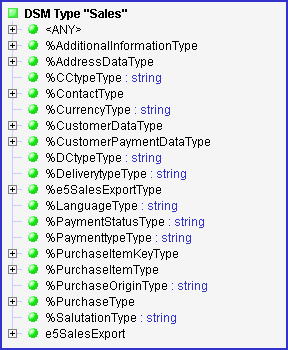
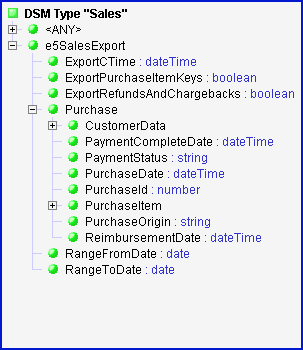
The Element Types produced from XML Schema's global type definitions are considered as abstract Element Types (shown with '%'). That means, neither of them, as it is, can be assumed by any XML element. Anyway, you may find this notion useful to program specific processing for the whole set of different physical Element Types derived from the same global type definition in the schema.
Local Element Types
Unlike DTDs, where all defined XML elements have global scope, XML Schemas allow defining XML elements locally within the definitions of- any other elements (both global and local ones)
- global complex types
- global model groups
FlexDoc/XML resolves this problem by introducing Local Element Types.
For every local element definition in the XML schema, there is a certain logical Local Element Type representing it in the XML Type. In various treeviews in the Template Designer, the Local Element Types are shown as child nodes of their parent Element Types (see the right picture above).
The logical Element Types representing the XML schema's global element definitions as well as the definitions of global types (see xsd.includeAbstractTypes option) are called Global Element Types.
Since the names of Local Element Types are not guaranteed to be unique anymore, to distinguish all logical Element Types from one another, FlexDoc/XML generates for each Element Type a special global name, which is unique for the whole XML Type. Further, the Element Type is referred by that global name in every situation that may be ambiguous.
The global name of a Global Element Type is always the same as its normal (local) name.
For a Local Element Type, its global name is generated according to the following rules:
- When the Element Type's local name is unique for the whole XML Type, that name will be also the global name of that Element Type.
-
When the corresponding
<xs:element>definition is based entirely on a certain global complexType/simpleType and looks like:-
<xs:element name="name" type="typeName"/>
-
name%typeName
-
-
When the type of the local element is defined anonymously within the
<xs:element>, which may look like this:<xs:element name="name">
<xs:complexType> ... </xs:complexType>
</xs:element>
-
When it is nested within a certain global
<xs:complexType>with the name'type_name', the Element Type's global name will be this:%type_name$name -
When it is nested within a certain global
<xs:group>with the name'group_name', the Element Type's global name will be this:!group_name$name -
At last, when the local
<xs:element>definition is nested within another<xs:element>definition whose corresponding Element Type has the global name'parent_global_name', then the global name of the given local Element Type will be produced as:
That is, it will be represented as the full paths formed from names of nested schema components separated with '$' starting from a certain global component until the given localparent_global_name$name<xs:element>definition. For example:DeliveryContact$Address$City
See also XSDDoc | Documentation Features | Documenting of local elements, which is related to this topic.
Declaring Namespaces
When namespaces are used, they transform each XML name (of an XML element or attribute) into three entities:- Namespace URI
- Prefix
- Local Name
Instead of URIs, in XML documents, the namespace prefixes are used. Now, an XML name should be written in the following form:
- Prefix:LocalName
Each Prefix is simply a shortcut to a particular namespace URI. Namespace prefixes are specified in XML documents locally and may vary from one XML to another. For instance, one XML document may contain <xsd:complexType> element tags, whereas other document will call the same things as <xs:complexType>.
Because namespaces were introduced above the initial XML 1.0 standard, all possible XML documents now are subdivided into namespace-aware and namespace-unaware ones.
When an XML document is namespace-unaware, nothing prevents it to use the XML names looking as prefix:name. However, in that case, the whole such a name will be considered as a local one (no binding to a namespace URI occurs). DTDs are namespace-unaware by default (however, they may still define XML names with prefixes which can be treated as references to actual namespaces in the XML documents).
FlexDoc/XML handles namespaces in the following way.
By default, any XML Type is namespace-unaware. That means, any XML files will be parsed in namespace-unaware mode and any XML names will be treated exactly as they are written.
To make an XML Type namespace-aware, you should declare certain namespaces associated with it. Each namespace should be declared with the following settings:
Where <n> is a number identifying the namespace declaration (which is actually used to connect the declaration's properties together).- <typeId>.ns.<n>.uri=<URI>
- Specifies the namespace URI.
- <typeId>.ns.<n>.prefix=<prefix1>;<prefix2>;...
-
Specifies one or more prefixes associated with this namespace.
Like XML documents, FlexDoc/XML also needs some shortcuts to refer to particular namespaces. The first prefix specified with this setting (prefix1) will be used as the one. That prefix will appear in the Template Designer and will be stored in FlexDoc templates (as part of qualified names).
Each namespace's URI, on the contrary, is specified only once in the XML Type config-file and never stored anywhere else. The binding between prefixes and URIs occurs dynamically.
That system makes your templates absolutely independent on anything. You may use different namespace prefixes in your XML Schema files (or DTD) assigned to this XML Type. And you may quickly change any namespace URI itself without changing any templates.
Other prefixes specified with this property are used only together with DTDs (see Assigning DTD).
Actually, nothing prevents you from using namespace prefixes in your DTD (so that XML names will look as qualified ones). But since DTDs are namespace-unaware, XML parser will not recognize those prefixes and bind them automatically to the particular URIs. However, FlexDoc/XML can do this for you. The only what you need is to specify with the ns.<n>.prefix property all possible prefixes used in your DTD which you want to bind to the specified URI.
- <typeId>.ns.<n>.default=<true | false>
-
If
true, indicates that this is the default namespace for the given XML Type.When a namespace is declared as default, any XML names associated with it will be used in templates (and shown in the Template Designer) without namespace prefixes. You may use this setting to quickly transform your namespace-unaware templates into namespace-aware ones. Just specify in your XML Type the default namespace, and your templates will be ready to process the namespace-aware XML files.
By default, this setting is
false.
Let's suppose your XML files will be starting from something like this:
-
<?xml version="1.0" encoding="utf-8"?>
<rdf:RDF
  xmlns:rdf="http://www.w3.org/1999/02/22-rdf-syntax-ns#"
  xmlns:dc="http://purl.org/dc/elements/1.1/"
  xmlns="http://purl.org/rss/1.0/"
>
...
-
rss.name = My RSS
rss.xsd.files = C:/xsd/rss-1_0.xsd;C:/xsd/rdf.xsd;C:/xsd/dc.xsd
rss.ns.1.uri = http://purl.org/rss/1.0/
rss.ns.1.default = true
rss.ns.2.uri = http://www.w3.org/1999/02/22-rdf-syntax-ns\#
rss.ns.2.prefix = rdf
rss.ns.3.uri = http://purl.org/dc/elements/1.1/
rss.ns.3.prefix = dc
Pseudo-elements
When the FlexDoc/XML Generator receives an XML file, it calls the XML parser which parses it into the DOM (Document Object Model).The DOM is basically a tree whose nodes represent everything contained in the source XML file. Most of those nodes are just dedicated to XML elements and their attributes. However, some of DOM nodes represent other things contained in the XML document, such as Text, Comments, Processing Instructions and so on.
The DOM tree starts from a special root node called Document node. This node represents the whole XML document. The Document node, among other things, always contains the Document Element node which represents the root element of the XML document.
FlexDoc/XML provides access to almost all types of DOM nodes. It does this by representing the original XML DOM in a bit extended form called XML DSM (Data Source Model). Each XML DSM is linked to the original DOM provided by the XML parser. It maps all XML element into DSM elements and all XML attributes into DSM attributes.
Besides this, the XML DSM maps all other (non-element/attribute) DOM nodes into DSM elements of special Pseudo-Element Types. We shall call those extra elements simply pseudo-elements.
All pseudo-elements have their names started with '#'.
Each Pseudo-Element Type is linked to a certain type of non-element/attribute DOM nodes. Depending on that type, a pseudo-element may contain specific DSM attributes representing the original node's properties. Some pseudo-elements may also have children (which can be both pseudo-elements and normal ones) and be children themselves of normal XML elements.
FlexDoc/XML treats pseudo-elements in the same way as the normal XML elements. You can organize iterations by pseudo-elements, access their attributes, reference to them within Location Paths and do anything else. As an example of an application where pseudo-elements are heavily used, see XMLDoc.
Currently, FlexDoc/XML supports the following types of pseudo-elements:
Since some pseudo-elements are useful only in rather special situations, by default, not all pseudo-elements are included automatically in every XML Type. The following XML Types config properties control pseudo-elements:- <typeId>.pseudo-elements.all=<true | false>
- If
true, enables all Pseudo-Element Types at once. - <typeId>.pseudo-elements.<NAME>=<true | false>
- Enables/disables an individual Pseudo-Element Type with the name #NAME. This setting overrides the pseudo-elements.all property.
- <typeId>.defaultRootElement=<DocumentElement | Document | Documents>
-
Specifies from which element the generator starts processing an XML document
(that is, which element will be used as the root element
for a template processing the whole XML document):
- DocumentElement
- This is the default setting. The Document Element becomes the template's root element.
- Document
- The template's root element is the #DOCUMENT pseudo-element. Use this setting when you need to process all nodes of a single XML document.
- Documents
- This setting allows you to process multiple XML files in a single pass
so as to generate a single documentation from all of them.
In that case, the main template receives as its root element the #DOCUMENTS pseudo-element representing the list of all initially loaded input XML files specified to process by the generator.
For more information about processing of multiple XML files, see the description of the #DOCUMENTS pseudo-element and XMLDoc | Templates as an example of using it.
Example:
The following settings enable all pseudo-elements except #CDATA and tell the generator to start the processing of each XML document from the #DOCUMENT pseudo-element:
  my_xml.pseudo-elements.all=true

  my_xml.pseudo-elements.CDATA=false

  my_xml.defaultRootElement=Document
This table provides details about all Pseudo-Element Types:
| Pseudo-Element | Description | ||||||||||||
|---|---|---|---|---|---|---|---|---|---|---|---|---|---|
 #CDATA #CDATA
|
Represents CDATA sections of the XML document. CDATA sections are used to escape blocks
of text containing characters that would otherwise be regarded as markup.
By default, CDATA sections are parsed into the normal TEXT nodes. However, when #CDATA pseudo-elements are enabled, the CDATA sections will be recognized separately and produce #CDATA pseudo-elements. This feature may rarely be used, mostly when you need to reproduce the original content of an XML file (see XMLDoc | Templates as example).
Example: The following CDATA section in an XML file:
|
||||||||||||
|
#COMMENT
|
Represents a COMMENT node. If enabled, #COMMENT pseudo-elements may appear as children
of any normal XML elements as well as within the pseudo-element #DOCUMENT.
Example: The following comments in an XML file:
"my comments".
|
||||||||||||
|
#CUSTOM
|
Represents a custom pseudo-element.
About Custom Elements Most of the data processed by a template come from some external data source via its virtual XML-like representation called Data Source Model (DSM), which maps everything onto some elements and their attributes.Therefore, most of the functionality available in templates (such as iterators, hash-maps and so on) is intended for processing of elements and attributes. But what if you want to use that functionality to process some different data, for instance, those coming from template parameters or elsewhere? Custom elements allow you to do that! Using custom elements, you can wrap any your data in the form of elements and attributes. Further, you can process such elements using standard means either separately or together with some elements from the main data source.
Basically, you may need custom elements in two situations:
1). Extending or completing a set of ordinary elements of the main data source. Suppose you have some set of references (coming, for instance, from the values of attributes of other elements). Those references contain the qualified names of some elements that you need to print. At minimum, you should print just the element names. But it will be much better if you add some extended information about each element. Most of the referenced elements can be found in the data source. The problem is that a few of them may not exist there. That's because those few elements represent some well-known entities, which do not need to be copied everywhere (e.g. this may be some built-in predefined data types and so on). Everyone who knows the subject of that external data source must also know about those basic things. Well. Everyone, but not your templates! If all the references could be resolved into elements, you would just feed those elements to an Element Iterator, sort them as needed and print everything about each element. But a few elements may be not found, and yet you should print something about them too. At least their names... Well, you have those names from the references! But how can you feed the names, which are strings, to the Element Iterator? Very simply. You should wrap each string with the name in a custom element and pass that element to the Iterator along with the elements from the data source. You can even construct such custom elements so that they will look like real ones (e.g. contain some attributes expected from the real elements). For instance, you may assign the name taken from the reference to the "name" attribute. This may allow you to specify sorting of all elements uniformly (e.g. by the values of "name" attributes contained in both real and custom elements). 2). Using element/attribute functionality for non-DSM data. Another situation is when you have some data completely different from the main data source. However, you want to process them with some functionality available only for elements and attributes. Here is an example. Suppose you need to design a template to process (document) certain "custom tags" coming from the external data source. Those tags describe some data source specific things. To a template, all such tags will appear as ordinary DSM elements of the same type and all the properties of the tags will be represented by the values of the element attributes. The "custom" means that some critical properties of those tags (such as possible tag names and their meanings) are unknown in advance. Instead, they are created by the user who produces the data source. In fact, the same person may be using your template to document his/her data source (which may be actually a representation of some project written in Java or other language). What is more, the user may want to be able to customize easily the appearance of specific custom tags in the output documentation, for instance, to provide the tag title and so on. At that, the user does not want to customize your template each time he or she introduces a new tag. How can you implement such requirements?
You can do this by introducing a special template parameter
Further, in your template, the first thing you may program to do will be parsing all the tag specifications passed via
What is the advantage of all of this?
Using the Using Custom Elements Custom elements are created withCustomElement() function.
You can load a custom element with some useful data by specifying its value when you create it:
GOMElement.value property:
setAttr() function, at any time, you can add new attributes or change the values of existing ones.
You can equally remove any of the attributes:
Custom Element Features
|
||||||||||||
|
#DOCTYPE
|
This pseudo-element represents the <!DOCTYPE> instruction of the XML file.
If enabled, it may appear only as a child of the #DOCUMENT pseudo-element.
Attributes:
|
||||||||||||
|
#DOCUMENT
|
This pseudo-element is linked to the DOM Document node and represents the whole XML document
(therefore, only one instance of it may exist). If you need to process all possible nodes in the XML document, you should start
from this pseudo-element. See <typeId>.defaultRootElement setting for more details.
Attributes:
|
||||||||||||
|
#DOCUMENTS
|
This pseudo-element represents the list of all open XML documents.
When <typeId>.defaultRootElement property of XML Type config is set to 'Documents', all XML files specified to process by the generator are passed to the main template as children of #DOCUMENTS pseudo-element, which the template receives as its root element. Every XML file will be open, parsed and represented as #DOCUMENT child element. Further, within the template's root block, you can organize iteration by such children and process every XML document as you need.
Function
All open XML documents together constitute a single DSM (Data Source Model).
This allows processing everything as a single "meta" XML document. In particular, you can iterate and access elements
and attribute contained in different XML documents simultaneously within the same
iterators
and other template components.
An identifier of each XML element will be unique for the whole DSM (see See XMLDoc | Templates as an example of this kind of processing. Children: |
||||||||||||
|
#NAMESPACE
|
Represents a namespace binding specified in an XML element.
If this pseudo-element type is enabled, each namespace binding specified in an element with one of
If an XML element contains several namespace binding declarations, there will be as many #NAMESPACE pseudo-elements added to the element's real children. All namespace bindings declared in an XML document can be obtained via namespaces attribute of #DOCUMENT pseudo-element. As an example of using #NAMESPACE pseudo-elements, see XMLDoc | xmlns-bindings.tpl template. Attributes:
|
||||||||||||
|
#PI
|
Represents a Processing Instruction. If enabled, #PI pseudo-elements may appear as children
of any normal XML elements as well as within the pseudo-element #DOCUMENT.
The following Processing Instruction in an XML file:
|
||||||||||||
|
#TEXT
|
Represents a TEXT node. If enabled, #TEXT pseudo-elements may appear as one or multiple children of any normal XML element.
The following piece of an XML:
'par' element with the three children:
|

Element Image Provider
FlexDoc/XML templates operate with abstract data entities called DSM elements and DSM attributes, on which everything contained in XML files (as well as even the XML files themselves; see #DOCUMENTS) is mapped. That mapping is maintained by a special module called XML DSM driver.Each DSM element may have a certain graphic representation called element image. Element images are typically some kind of diagrams, which may be supplied with hypertext imagemaps that allow linking some image regions to anything else.
Element images (and imagemaps to them) are provided by a special extension (plugin) of the DSM driver called Element Image Provider. Further, they can be easily operated in templates using Image Controls, which can insert the images in the output and hyperlink them to other parts of the documentation.
Since XML is a universal data markup language, there cannot be a single meaning what “element image” actually is. That comes down to a particular XML-file data source, which is described by the given XML Type. So, any element image provider must be specified in the XML Type definition with the following settings:
- <typeId>.imageProvider.name=<image_provider_name>
-
Specifies the name of a Java service, which implements the Element Image Provider
(i.e.
'xyz.flexdoc.xml.XMLImageProvider'interface).This is the primary setting that identifies the Element Image Provider.
Example:
xsddoc.imageProvider.name = DiagramKit
- <typeId>.imageProvider.class=<image_provider_class>
-
Specifies the qualified name of the Element Image Provider's main class
(which should implement
xyz.flexdoc.xml.XMLImageProviderinterface).This setting is obsolete and has been replaced with the Java service name setting. It's supported for compatibility with old custom templates.
Example:
xsddoc.imageProvider.class = xyz.flexdoc.xml.xmlspy.SpyKit
- <typeId>.imageProvider.classPath=<class_path>
-
Specifies the file path, where any additional Java classes necessary for running the Element Image Provider can be found.
This setting is particularly important when FlexDoc/XML runs in non-modular mode (e.g. from Maven).
- <typeId>.imageProvider.<name>.<param>=<value>
-
Some Element Image Providers may have additional specific parameters that can be also passed through XML Type config-file.
That's done with the settings like shown above, where
<name>is the image provider name, and <param> is the name of a particular parameter.Example:
    xsddoc.imageProvider.XMLSpy.version = ...

    xsddoc.imageProvider.XMLSpy.libPath = ...

    xsddoc.imageProvider.OxygenXML.command = ...

    xsddoc.imageProvider.OxygenXML.config = ...
Passing Settings from Command Line
Although, for a particular template set, the meaning of element images is always the same (e.g. all of them are component diagrams), precisely how those diagrams look may be different as well as different external systems may generate such diagrams. So, the Element Image Provider for a given XML Type may actually have different implementations.To allow easily switching to any of those implementations, rather than being specified directly in XML Type config-file, the particular settings may be passed from the Java command-line using macros.
Example:
xsddoc.imageProvider.name = %IMAGE_PROVIDER%
'IMAGE_PROVIDER' is a macro that is expanded to the image provider name.
The value of that macro can be specified on the Java command-line using -m option, e.g.:
-
-m:IMAGE_PROVIDER=DiagramKit
See Also:
- FlexDoc/XML | XSDDoc | Templates | XML Type
- FlexDoc/XML | DiagramKit | FAQ | Generator Setups | How to setup DiagramKit Plugin?
Using Macros
Macros are variables used to avoid specifying the exact values in the XML Type config-file.The value passed in the macro is obtained with the expression like this:
-
%MACRO_NAME%
| Macro | Description |
|---|---|
FDH |
The pathname of the FlexDoc/XML home directory.
The initial value of this macro is the absolute pathname of the directory containing the FlexDoc/XML Java library
However, a different directory pathname can be assigned in flexdoc.config file.
(Actually, this is already done in the default flexdoc.config,
which specifies 'FlexDoc/XML home directory' as the parent of the Such an arrangement is intended to allow easy distribution of the specific files needed for running FlexDoc/XML so as their locations would better fit for your entire project. |
THIS_DIR |
This macro is expanded into the absolute pathname of the directory containing the given file (where the macro is used).
The macro value is calculated dynamically and may not be redefined.
You may use this macro, for instance, in your XML Type Configuration File to specify an XML schema file located in the same directory. For example:
|
All other macros are arbitrary and may come from the three sources:
-
Specified with -m option both on the Generator
and Template Designer command line, e.g.:
-
-m:IMAGE_PROVIDER=DiagramKit
'IMAGE_PROVIDER'is the macro name and'DiagramKit'is the value passed through it. -
- Specified in FlexDoc/XML main configuration file (flexdoc.config).
-
Specified in the XML Type config-file with the settings like this:
- <typeId>.macro.<name>=<value>
-
xsddoc.macro.IMAGE_PROVIDER = DiagramKit
When the macro name is unknown, the macro call (e.g. %UNKNOWN_MACRO%) returns empty string.
3. Running Template Designer
To start the Template Designer, just rundesigner.bat found in
{flexdoc-xml}/bin directory, where {flexdoc-xml} is FlexDoc/XML home directory.
Command Line
Here is the exact command line to launch the Template Designer (applicable with Java 9 or later):-
  java
  [java_options]
  --module-path <module_path>
  --module flexdoc.xml/xyz.flexdoc.xml.Generator
  [options]
  [template files]
| Command/Arg | Explanation |
|---|---|
java
|
A system command used to invoke JVM (Java Virtual Machine).
On Windows, that command may be as simple as
Just don't forget to enclose it in double quotes, when the pathname contains spaces! |
[java_options]
|
The JVM options.
If you are going to run the Generator from the Template Designer (see Invoking Generator from Template Designer), use -Xmx option to set the maximum heap size allocated by JVM. Otherwise, the available memory may be not enough for the generator – it will be executed by the same JVM! For example, setting -Xmx2048m will allocate 2048 Mb for the heap. |
<module_path>
|
Specify FlexDoc/XML module path.
Modules is a feature of modular Java that appeared since Java 9. Now, besides classes and packages,
a Java application is broken also into modules. Module is a top-tier structure, which was introduced for better control of class dependencies, better encapsulation
and the possibility of building custom JREs (which may include things not provided in the standard JDK).
On Windows, the FlexDoc/XML module path looks as follows:
Each module has a separate name and is typically packed as a separate jar-file (whose name is not necessary the same as the module name). The module path is the list of those module jar-files (their pathnames) and/or directories where they are found.
|
FlexDoc/XML main module name
|
The name of the Java module, which the generator class belongs to: flexdoc.xml
In modular Java, the application main class cannot be invoked just by its qualified name. The name of its module must also be specified. |
designer class
|
The qualified name of the Template Designer main Java class: xyz.flexdoc.xml.Designer
|
[options]
|
Template Designer command line options (see below). |
[template files]
|
The pathnames of the template files to open.
If several templates are specified, all of them will be open in separate designer windows.
Template Designer uses settings contained in designer.config file. If no templates have been specified on the command line, the last edited template will be open automatically. |
Command Line Options
The Template Designer supports the following command line options:
|
-config -defaultcatalog -flexdocconfig -license |
-m -r -updatetemplates -xmltype |
Option Details
- -config <file>
- Specifies an alternative Template Designer configuration file (designer.config), which is used instead of the default one (specified in the flexdoc.config).
- -flexdocconfig <file>
- Specifies an alternative path to the FlexDoc/XML main configuration file (flexdoc.config).
- -license <files>
-
Specifies the locations of one or many license files.
The option value may include multiple file pathnames, which should be separated with the OS-specific path-separator character (e.g.
';'under MS Windows or':'under Linux). Alternatively, you can specify different license files with any number of-licenseoptions on the command line.The license files directly specified on the command line with the
-licenseoptions will be loaded (and used) before any other license files:- Those assigned in the flexdoc.config
- The default license file found near the FlexDoc/XML Java library file 'flexdoc-xml.jar'
- The license files found near the main templates of commercial template applications
-licenseoption, that one will be used.See also Multiple Licenses.
-
-m:<macro>=<value>
or
-m:<macro> <value> -
Specifies the value of a macro, which can be used in
flexdoc.config and XML Type Configuration
files to allow configuring them from the command line.
Notes:
-
When the macro value contains spaces, enclose it in double quotes
(for example:
-m:LIBPATH="C:\Program Files\..."). - The first variant of this option allows you to specify the macro with a single command line argument, the second variant breaks the option into two arguments (one for the macro name, another one for the macro value).
-
When the macro value contains spaces, enclose it in double quotes
(for example:
- -xmltype <files> or -xmlconfig <files>
-
Specifies the locations of one or many XML Type Configuration Files.
The option value may include multiple file pathnames, which should be separated with the OS-specific path-separator character (e.g.
';'under MS Windows or':'under Linux). Alternatively, you can specify different config-files with any number of-xmltypeoptions on the command line.All XML Type Configuration Files specified with the
-xmltypeoptions are loaded in addition to those assigned statically in the flexdoc.config. However, when an XML Type happens to be defined simultaneously in several files, the definition contained in a file directly specified on the command line will be used the first. - -defaultcatalog <file | URL>
-
Specify the location of the default XML catalog file.
The option argument may be both the local file pathname and a URL.
For more details, please see: Installation / Configuration Files | Default XML Catalog
- -updatetemplates <dir>
- Updates all FlexDoc templates contained in the specified directory. You can use this option to upgrade your old (existing) templates according to a new FlexDoc/XML version or new license you are using now. When this option is specified, the designer works only in command mode and no GUI is started.
- -r
- Recurse subdirectories. This option works only in conjunction with -updatetemplates option.
Creating New Template
Once you have finished with defining the XML Type (which will provide the datatype information about your XML files) you can start designing your template.
Run designer.bat and select in the main menu “File | New Template” item. You will see the following dialog:
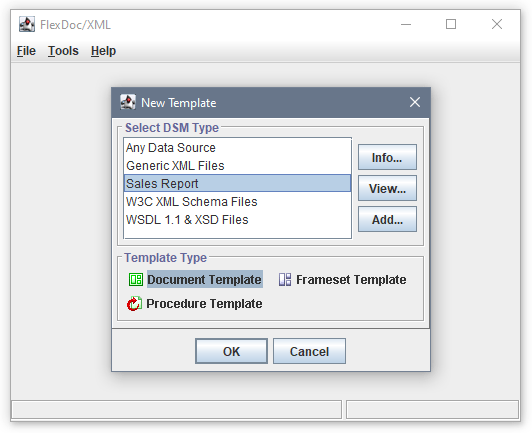
You should select the XML Type on which your template will be based. (If the list does not include the necessary XML Type, you can load its definition from the corresponding XML Type Configuration File by clicking the “Add” button.)
Each template is always linked to a certain XML Type. That means, the template is programmed to process only those XML files which comply with that XML Type. The XML Type's identifier is stored in the template. So, each time the template is loaded in the Template Designer or processed by the generator, the corresponding XML Type is dynamically bound to the template so as to provide the data type information necessary for the template processing.
To provide all the information required for the designing or processing of the template, the XML Type needs to be initialized first. This happens when the XML Type is accessed for the first time. Any DTD or XSD files assigned to it are loaded and parsed. If during this an error occurs, the template will not be loaded! Another problem may happen when since the last modification of the template, the data type information specified in the XML Type, on which the template is based, was changed. In that case, the template will still be loaded in the Template Designer, however some settings specified in it may become incorrect. Such settings need to be fixed. Otherwise, the template may cause errors during processing by the generator.
In the “Template Type” panel, you should select which type of the template is to be created. The template type determines how the template is processed and what is generated by it (as well as some additional features related to this). Currently, there are three template types:
- Document Template generates a single document file (in any of the supported formats) or a part of the document file.
-
Frameset Template
generates a multi-file framed HTML documentation. This template normally calls from itself
many other document templates (subtemplates), which generate particular HTML files to be loaded in the frames.
This template also contains the definition of the HTML frameset, by which the
index.htmlis generated. - Procedure Template does not generate any output. Instead, such templates are called normally only once from the main templates to create specific global data structures (e.g. element maps) to be used further throughout the whole template set. In a procedure template, the data query capabilities of the template components (such as Element Iterator) are employed to collect the specific information and represent it internally in a way convenient for a faster access later.
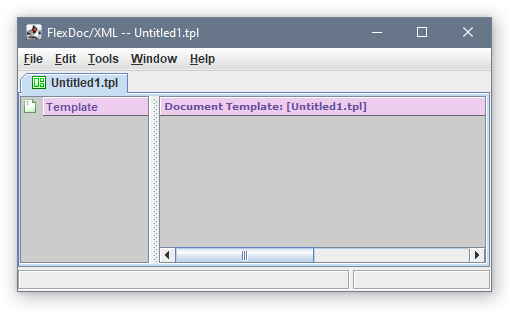
What exactly you should do the next is a topic vast enough to be discussed here. We refer you to the general FlexDoc.XYZ Documentation.
Invoking Generator from Template Designer
To accelerate the processes of developing your template application, FlexDoc/XML allows launching the template interpreter (the generator) directly from the Template Designer.To invoke the generator, just select the “Tools | Generator” item in the Template Designer main menu. You will see the Generator Dialog as shown on the following screenshot:

echo() function,
which you can use in FlexQuery-expressions within your templates.
This function effectively does nothing, but it prints everything passed through it to the Java console window (i.e. Java System.out stream).
This may help you to track how particular template components and settings are interpreted by the generator.