FlexDoc/Javadoc - Integrations
Apache Ant
You can easily integrate
FlexDoc Doclet with the
Apache Ant automated build system.
Here is an example.
Let's suppose, we want to generate a framed HTML documentation using
FramedDoc.tpl template
by a multi-module Java project, whose source code is found in the directory:
-
C:\flexdoc-javadoc\demo\modular\
Here is a simple Windows command file that launches such a generation:
-
set FDH=C:\flexdoc-javadoc
|
javadoc |
    -J-Xmx1024m

    -d %FDH%\out

    -doclet xyz.flexdoc.javadoc.Doclet

    -docletpath %FDH%\lib\flexdoc-javadoc.jar

    -template %FDH%\templates\classic\FramedDoc.tpl

    -format HTML

    -overview %FDH%\demo\modular\overview.html

    -link https://docs.oracle.com/en/java/javase/17/docs/api/

    -p "windowTitle=FlexDoc/Doclet Demo"

    -p "docTitle=FlexDoc/Javadoc & Ant Integration Demo"

    -taglet taglets.OracleLinkTaglet

    -tagletpath %FDH%\demo

    -p "include.tag.custom=oracleLink:a:Oracle Links:"

    -nodialog true

    -launchviewer false

    --module-source-path %FDH%\demo\modular

    --module apps,misc
|
The following is an equivalent Ant
build.xml file that does the same:
build.xml
<?xml version="1.0"?>
<project basedir="." name="FlexDoc Ant Demo">
<!-- the location of FlexDoc/Javadoc home directory -->
<property name="FDH" value="C:/flexdoc-javadoc"/>
<!-- the demo Java project source directory -->
<property name="SRC" value="${FDH}/demo/modular"/>
<target name="demo">
<!--
Specifying Javadoc task.
The 'maxmemory' attribute sets the maximum heap size
available to the Java VM running Javadoc.
-->
<javadoc maxmemory="1024m" modulesourcepath="${SRC}" destdir="${FDH}/out">
<!-- specifying the doclet -->
<doclet name="xyz.flexdoc.javadoc.Doclet" path="${FDH}/lib/flexdoc-javadoc.jar">
<!-- specifying the doclet command-line parameters -->
<!-- the main template -->
<param name="-template" value="${FDH}/templates/classic/FramedDoc.tpl"/>
<!-- the output format -->
<param name="-format" value="HTML"/>
<!-- HTML file with the description for project Overview page -->
<param name="-overview" value="${SRC}/overview.html"/>
<!--
The location of an external documentation of third-party Java APIs
used by this project to be linked to from the generated documentation
-->
<param name="-link" value="https://docs.oracle.com/en/java/javase/17/docs/api/"/>
<!-- pass some template parameters -->
<param name="-p" value="windowTitle=FlexDoc/Doclet Demo"/>
<param name="-p" value="docTitle=FlexDoc/Javadoc & Ant Integration Demo"/>
<!--
Specify a demo taglet that processes custom @oracleLink tags used in the taglet's
source doc-comments, see: ${SRC}/misc/taglets/OracleLinkTaglet.java
-->
<param name="-taglet" value="taglets.OracleLinkTaglet"/>
<param name="-tagletpath" value="${FDH}/demo"/>
<!--
Specifying the documentation heading for @oracleLink block-tags.
Since everything that gets into the generated documentation is programmed in
the template set, passing such a heading is also the matter of template parameters
-->
<param name="-p" value="include.tag.custom=oracleLink:a:Oracle Links:"/>
<!-- suppress showing up the doclet GUI -->
<param name="-nodialog" value="true"/>
<!-- do not launch documentation viewer -->
<param name="-launchviewer" value="false"/>
</doclet>
<!-- specifying the Java source modules to document -->
<module name="apps,misc"/>
</javadoc>
</target>
</project>
To run that build.xml file, you can use a Windows BAT specified like the following:
set ANT_HOME=C:\apache-ant
set PATH=%ANT_HOME%\bin;%PATH%
set JAVA_HOME=C:\Program Files\Java\jdk-17
call %ANT_HOME%\bin\ant.bat demo
(Note, the BAT should be started from the directory containing the
build.xml file!)
Apache Maven
Integrating
FlexDoc Doclet with
Apache Maven
automated build system may be a bit more complicated because they tend to constantly change something. So, what worked some time ago, may be not working now.
The following sample project POM file did work with Maven 3.9.0 on Windows:
pom.xml
<project>
...
<!-- Specifying properties (i.e. the variable used in further settings) -->
<properties>
<!-- FlexDoc/Javadoc home directory -->
<FDH>C:/flexdoc-javadoc</FDH>
<!-- the demo Java project source directory -->
<SRC>${FDH}/demo/non-modular</SRC>
</properties>
...
<build>
<sourceDirectory>
${SRC}
</sourceDirectory>
</build>
...
<reporting>
<plugins>
<!-- Configure Maven Javadoc plugin -->
<plugin>
<groupId>org.apache.maven.plugins</groupId>
<artifactId>maven-javadoc-plugin</artifactId>
<version>3.5.0</version>
<configuration>
<!-- The maximum heap size available to JVM when running Javadoc -->
<maxmemory>1024m</maxmemory>
<!-- Using FlexDoc Doclet -->
<doclet>xyz.flexdoc.javadoc.Doclet</doclet>
<docletPath>${FDH}/lib/flexdoc-javadoc.jar</docletPath>
<!-- Specifying command-line parameters for FlexDoc Doclet -->
<additionalOptions>
<!-- The main template -->
-template ${FDH}/templates/classic/FramedDoc.tpl
<!-- The output format -->
-format HTML
<!-- HTML file with the description for project Overview page -->
-overview ${SRC}/overview.html
<!--
The location of an external documentation of third-party Java APIs
used by this project to be linked to from the generated documentation
-->
-link https://docs.oracle.com/en/java/javase/17/docs/api/
<!-- Pass some template parameters -->
-p "windowTitle=FlexDoc Doclet Demo"
-p "docTitle=FlexDoc/Javadoc & Maven Integration Demo"
<!--
Specify a demo taglet that processes custom @oracleLink tags used in the taglet's
source doc-comments, see: ${SRC}/taglets/OracleLinkTaglet.java
-->
-taglet taglets.OracleLinkTaglet
-tagletpath ${FDH}/demo
<!--
Specifying the documentation heading for @oracleLink block-tags.
Since everything that gets into the generated documentation is programmed in
the template set, passing such a heading is also the matter of template parameters
-->
-p "include.tag.custom=oracleLink:a:Oracle Links:"
<!-- Suppress showing up the doclet GUI -->
-nodialog quiet
<!-- Do not launch documentation viewer -->
-launchviewer false
</additionalOptions>
<!-- Tell Maven the output directory name -->
<destDir>flexdoc_doclet_output</destDir>
<!-- For the project-reports page -->
<name>FlexDoc Doclet Output</name>
<description>A Java API documentation generated with FlexDoc Doclet</description>
</configuration>
</plugin>
</plugins>
</reporting>
...
</project>
The complete working example is included in FlexDoc/Javadoc archive prepared for downloads.
Gradle
Equally, you can integrate
FlexDoc Doclet with the
Gradle Build Tool.
The following Gradle build file is an equivalent of the one in Ant's case.
build.gradle
apply plugin: 'java'
/* The location of FlexDoc/Javadoc home directory */
def FDH = 'C:/flexdoc-javadoc'
/* The location of the demo Java project source directory */
def SRC = "${FDH}/demo/modular"
/* The location of Java sources to document */
sourceSets {
main {
java {
srcDir "${SRC}"
}
}
}
task flexdocJavadoc(type: Javadoc) {
/*
Specifying the Java module source path.
This is the option necessary to Javadoc to process any multi-modular Java project.
Fortunately, unlike Maven, Gradle isn't meddling with it and allows to specify it directly.
*/
options.addStringOption("-module-source-path", "${SRC}")
source = sourceSets.main.allJava
destinationDir = reporting.file("flexdoc-doclet-demo")
title = "FlexDoc/Javadoc & Gradle Integration Demo"
/* Using FlexDoc Doclet */
options.docletpath = [file("${FDH}/lib/flexdoc-javadoc.jar")]
options.doclet = "xyz.flexdoc.javadoc.Doclet"
/* Set the maximum heap size available to the Java VM running Javadoc */
maxMemory = "1024m"
/* The main template */
options.addStringOption("template", "${FDH}/templates/classic/FramedDoc.tpl")
/* The output format */
options.addStringOption("format", "HTML")
/* HTML file with the description for project Overview page */
options.addStringOption("overview", "${SRC}/overview.html")
/*
The location of an external documentation of third-party Java APIs
used by this project to be linked to from the generated documentation
*/
options.addStringOption("link", "https://docs.oracle.com/en/java/javase/17/docs/api/")
/*
Specify a demo taglet that processes custom @oracleLink tags used in the taglet's
source doc-comments, see: ${SRC}/misc/taglets/OracleLinkTaglet.java
*/
options.addStringOption("taglet", "taglets.OracleLinkTaglet")
options.addStringOption("tagletpath", "${FDH}/demo")
/* Pass some template parameters */
options.addMultilineStringsOption ("p").setValue ([
"windowTitle=FlexDoc/Doclet Demo",
"docTitle=FlexDoc/Javadoc & Gradle Integration Demo",
/*
Specifying the documentation heading for @oracleLink block-tags.
Since everything that gets into the generated documentation is programmed in
the template set, passing such a heading is also the matter of template parameters
*/
"include.tag.custom=oracleLink:a:Oracle Links:"
])
/* Supress showing up the doclet GUI */
options.addStringOption("nodialog", "true")
/* Do not launch documentation viewer */
options.addStringOption("launchviewer", "false")
}
To run that build.gradle file, you can use a Windows BAT specified as follows:
set JAVA_HOME=C:\Program Files\Java\jdk-17

set GRADLE_HOME=C:\Gradle\gradle-8.0.1

call %GRADLE_HOME%\bin\gradle.bat flexdocJavadoc
Eclipse
Using
FlexDoc Doclet with
Eclipse
is most simple. You just need to fill out two dialogs.
First, select in the Eclipse main menu the «Project | Generate Javadoc...» item.
The following dialog will show up:
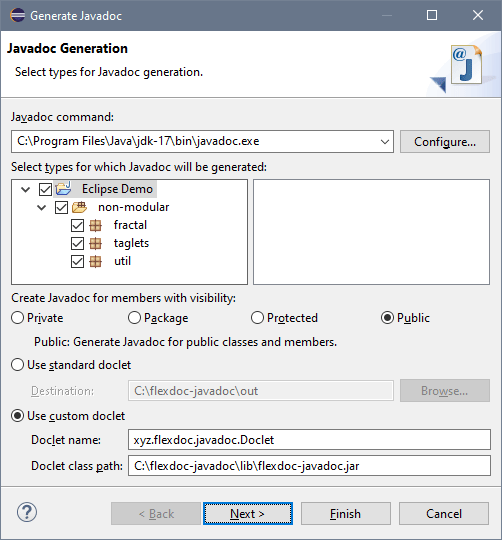
Make sure the following settings are specified:
-
In the «Javadoc command» field, provide the location of the Javadoc executable
in some JDK installed on your system.
-
Select «Use Custom Doclet».
-
In the «Doclet name» field, specify the name of the FlexDoc Doclet main class:
xyz.flexdoc.javadoc.Doclet
-
In the «Doclet class path» field, specify the full pathname of the FlexDoc Doclet
Java library file:
flexdoc-javadoc.jar.
This file is located in the 'lib' directory of your FlexDoc/Javadoc installation.
-
Now, you can click «Next».
Then, you will see the second dialog:
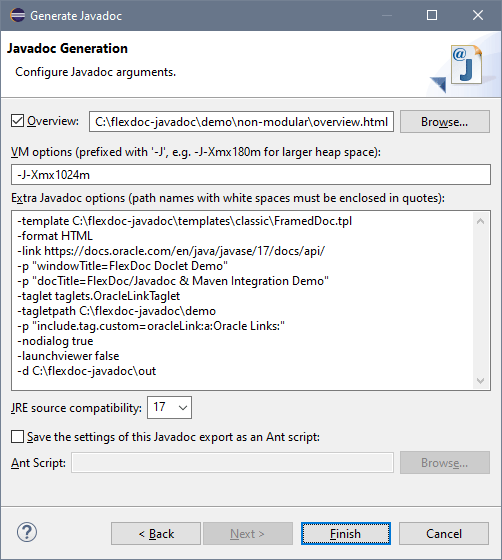
In this dialog, check the following fields:
-
In the «VM options» field, you should specify the maximum memory heap size
available to the JVM that will run Javadoc.
If you leave this field empty, Javadoc (that is the FlexDoc Doclet)
may slow down very much, especially on a big project, and you may get eventually
java.lang.OutOfMemoryError exception!
-
The «Extra Javadoc options» field is for the doclet-specific options.
All the command-line options processed by FlexDoc Doclet
that you may ever need should be specified here!
In particular, with the -d option you should specify
the output directory for the generated documentation.
Also, unless -nodialog option is specified directly,
the FlexDoc Doclet will launch the Doclet GUI over Eclipse.
(In fact, since Javadoc is run by a different JVM, the Doclet GUI will be completely independent on Eclipse).
Remember also that all missing options that the FlexDoc Doclet may need (including
template parameters)
will be taken from the generator.config created
when the Doclet GUI was invoked the last time.
(So, you should not wonder, how FlexDoc Doclet knows some specific settings you did not provide to it.)
Now, you may click «Finish» button to start Javadoc.
Other Systems
As being a
Javadoc Doclet
(that is a special plug-in for
Javadoc),
FlexDoc Doclet can be integrated with probably anything that runs Javadoc itself.
To use FlexDoc Doclet with a particular system, basically, you need to know how to specify the following settings:
- The doclet class name
- The doclet class path
- The doclet-specific Javadoc options
- The maximum heap size used by the JVM that runs Javadoc (i.e. how to pass to it the -Xmx option).
Once you know those things, you will be able to run
FlexDoc Doclet within your tool!