
FlexDoc.XYZ - Element Iterator Details
1. Collecting Elements by Location Rules
This is the most important method used in FlexDoc to obtain elements from the DSM (Data Source Model). A collection of elements is produced from the context element, according to a set of special Element Location Rules. Location rules are made of Location Paths, which themselves are used also separately for different purposes.Location Paths
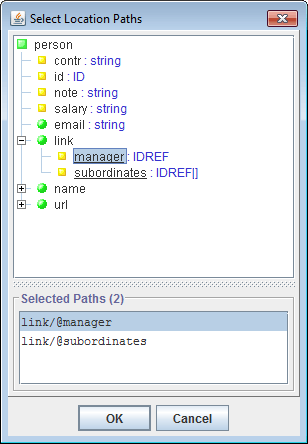
Location Paths are the expressions similar to XPath, which are used in FlexDoc templates to specify the search of elements or attributes.Although eventually they are string, when you design a template in the Template Designer, the Location Paths are normally not needed to be entered directly. Rather, they are constructed using special dialogs or can be selected in the Location Path Chooser, as shown on this screenshot:
The structure of each Location Path used in FlexDoc is the same as in XPath and looks as the following:
-
Step1 / Step2 / ... / StepN
-
Step1, ..., StepN-1- Element Location Steps
StepN- Element Location Step or Attribute Location Step
The interpretation of a Location Step consists of taking some initial set of DSM nodes (called step input set) and producing by it another set of DSM nodes (called step result set). How exactly it is done depends on the step's settings (see below). Those settings, in fact, specify how the step is interpreted against only one initial node. The entire result set is produced as a union of the result sets of the step interpretations against every node in the input set.
As a whole, the Location Path is interpreted as follows:
- The Step1 is interpreted against the Location Path's initial context node.
- Each StepN that follows is interpreted against the result set produced on the previous StepN-1.
- The result set of the last step becomes the result of the whole Location Path interpretation.
Every Element Location Step has the following structure:
-
axis :: ETs [filter]
-
axis-
Specifies the search axis that is a subset of DSM's nodes from
which the step's result set is collected. Currently, FlexDoc.XYZ supports the following axes:
child-
Includes children of the step's context node. This axis is used by default
(i.e. when no
axis::prefix is specified in the location step). self- Includes only the step's context node itself.
child-or-self- Includes the step's context node and all its children
descendant- Includes all descendants of the step's context node (i.e. its children, children of the children and so on).
descendant-or-self- Includes the step's context node and all its descendants.
@attribute^-
This axis, called link-axis, is an extension of the XPath standard introduced in FlexDoc.
It includes those elements of the Data Source Model
(which is a real or virtual XML-document) whose ID references are the values of the specified
context node attribute.
The
attributeis the name of a certain context element's attribute (whose type should be eitherIDREForIDREF[]).Such a specification is interpreted as follows:
When the context element contains an attribute with
'attribute'name, all values of that attribute are interpreted as the identifiers of some elements contained in the DSM. Each identifier is used to find a corresponding element, and, if found, that element is added to the step's result set.Example:
-
@elementReference^::Class
-
{ expr }-
This axis, called formula-axis, is another extension of XPath introduced
in FlexDoc. In effect, it covers the functionally of all other axes and is probably
the ultimate axis imaginable.
The elements included in that axis are produced by a FlexQuery expression specified between the curly brackets. The expression should return an enumeration of new elements, which it may produce from the step's context node (the element) passed to the expression as the generator context element (accessible via the
contextElementproperty).For example, the step:
-
child::Person
-
{ findChildren("Person") }::Person
Note: The expression specified in formula-axis should always return the
The returned enumeration should contain objects ofEnumerationtype. Otherwise, the generator will raise an error.GOMElementorDSMElementtypes (objects of other types will be ignored). Whennullvalue is returned, it is interpreted as the empty enumeration. -
ETs-
Specifies one or several matching Element Types.
Each element, to be included in the step's result set, should comply with
at least one of the specified matching Element Types.
The list of the matching Element Types can be defined as:
- A single Element Type name.
-
The following expression:
(ET1 | ET1 | ... | ETn), where eachETnis an Element Type name. -
The asterisk wildcard (
*), which will include all elements regardless of their type
filter-
This is a boolean FlexQuery-expression which defines the subquery for the location step filter.
When specified, this subquery is executed for each element to be included in the step's result set. The element is included only when the subquery returns
true.The tested element is accessible within the subquery as the generator context element (via the
contextElementproperty). The previous context element is restored again after the Location Path processing is finished.
@attribute
attribute is the name of the searched attribute.
The Attribute Location Paths are normally used to collect values of
the same attribute by a number of elements at once.
The interpretation result of such a Location Path is a vector of all values of all attributes found.
Compound Location Paths
You may join several Location Paths using '|' separator into a single expression:-
lpath1 | lpath2 | ... | lpathN
Location Rules
Each Element Location Rule has the following structure:-
Matching Element Types [matching condition] → Element Location Path
-
Matching Element Types-
The list of Element Types to which this rule is applied.
If the rule matches with any element type, the list can be replaced
with the wildcard:
* matching condition-
A boolean FlexQuery-expression that tests whether the rule should be interpreted
against a given element. If the expression returns
falsethe rule will be ignored. This is similar to the enabling condition of template components.The tested element is accessible within the expression as the generator context element (via the
contextElementproperty). Element Location Path- The Element Location Path specifying the set of the elements produced by the rule
Exactly, it works as follows:
- An element from the input set is made the generator context element.
-
All Location Rules from the vector are iterated.
For each rule:
-
The context element is tested whether it complies with any of the
Matching Element Types. -
If
matching conditionspecified, the context element must also comply with it (i.e. the condition subquery returnstrue). -
If all matching tests are passed, the
Element Location Pathspecified in the rule is interpreted against the context element. The new elements produced by it are added to the result set.
-
The context element is tested whether it complies with any of the
Example
Let's consider the data source that provides the basic information about a Java-project. It can be described with the following DTD:-
<!ELEMENT field>
<!ELEMENT method>
<!ELEMENT class (field*,method*,class*)>
<!ELEMENT package (class*,package*)>
-
Collect all classes (including the inner classes) contained both in the
context element
and in all its descendants:
-
* → descendant::class
-
-
If the context element is a package collect all top-level classes contained both in
it and in all its subpackages:
-
package → child-or-self::package/child::class
-
Recursive Location Rules
From the description above you can see that the only way to specify searching of elements in arbitrary depth from a given context node is using one of thedescendant-axes.
At that, the search will involve all the element subtree attached to the context node.
However, in some situations it may be needed to limit the search to only some branches of the subtree.
Constructing Element Location Paths
using only descendant-axes may be not enough to achieve the necessary effect.
Even more difficulties arise when the search in indefinite depth need to involve
link- or
formula-axes.
That problem was solved in FlexDoc by introducing Recursive Location Rules.
Recursive Location Rules are the same normal
Element Location Rules, but in addition marked with a special
recursive flag
 .
This affects how such rules are interpreted.
.
This affects how such rules are interpreted.
A vector of Element Location Rules that includes some recursive rules is interpreted in repeating steps. On each step, some new elements are produced, which are added to the result set. Those new elements become also the input for the next step and so on, until no new elements are produced.
Precisely, this works as follows:
- Step 1:
- All the rules (recursive and not) are interpreted against the context element received by the Element Iterator as described in the previous section. As the result, some new elements are produced and added to the collected set.
- Step N+1:
-
For the new element found on the previous Step N, all location rules
marked with the recursive flag are interpreted again
with each element successively selected as the rule's context element.
That produces more new elements, which are also added to the collected set.
Such steps are repeated until no new elements are found.
FlexDoc distinguishes elements by their ID. Therefore, only those elements are considered the new ones whose IDs have not yet occured on the previous iterations. Such an approach helps to prevent the infinite looping when the processed elements contains cyclic references, however, it requires each element to have a unique ID.
Example
Let's consider a little more complicated version of the previous example. Now, the data source providing the information about a Java-project allows you to know a parent of each class (if any it has) and the interfaces the class directly implements.The new DTD will be the following:
-
<!ELEMENT field>
<!ELEMENT method>
<!ELEMENT class (field*,method*,class*,interface*)>
<!ELEMENT interface (field*,method*)>
<!ELEMENT package (class*,interface*,package*)>

<!ATTLIST class extends IDREF>
<!ATTLIST interface extends IDREFS>
<!ATTLIST class implements IDREFS>
-
 class     → @extends^::class
 class     → @implements^::interface
 interface → @extends^::interface
interface type.
2. Generating Iteration Scope
Element Iterator provides four methods to specify the generation of the Element Iteration Scope (EIS) – that is how the elements for iterations are collected:Simple Location Rules
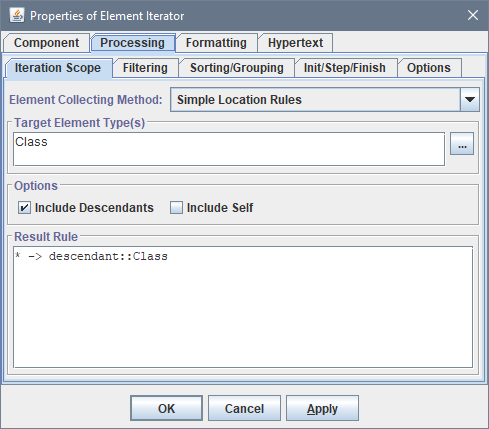
This is a simplified method, which allows you to quickly define a single Element Location Rule. It may be just enough for many purposes. There are only three settings to fill in:
- Target Element Type(s)
-
Specify one or many element types (
TargetETs), which the elements included in the generated EIS must comply with. - Include Descendants
- Specifies if the search should include all descendants of the context element.
- Include Self
- Specifies if the context element itself can be included into the EIS (in the case its type is appropriate)
-
* → child::TargetETs
* → descendant::TargetETs
* → child-or-self::TargetETs
* → descendant-or-self::TargetET
Advanced Location Rules
This is the most comprehensive method of defining Element Location Rules. It gives access to all features implemented in FlexDoc. The generation of the EIS is specified with the following settings:
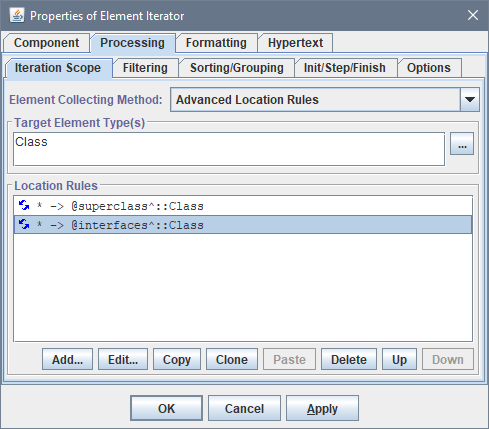
- Target Element Type(s)
- Specify one or many element types, which the elements included in the generated EIS must comply with.
- Location Rules
-
The list of the Element Location Rules specifying how the
EIS is generated
Defining a single Location Rule:
Defining a Location Step: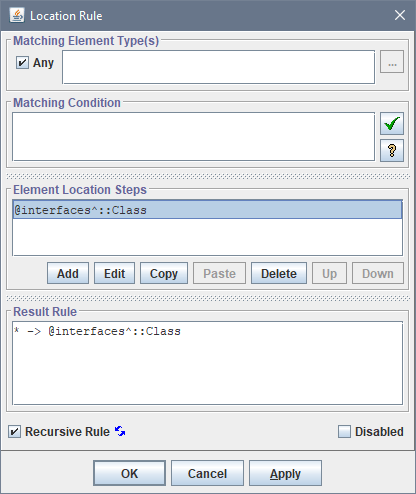

Sequence
An alternative method of the EIS generation not based on Element Location Rules. The EIS is produced as the sequence of the connected elements, according to the following settings:
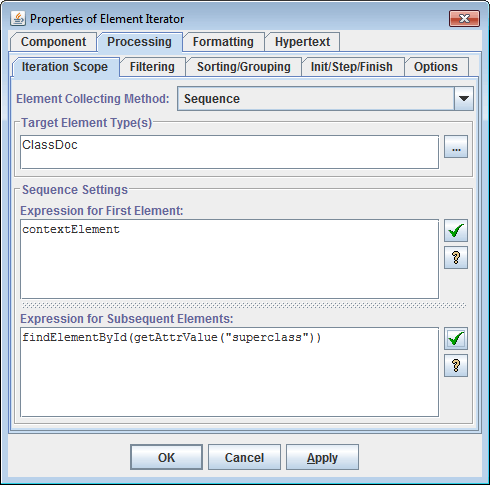
- Target Element Type(s)
- Specify one or many element types, which the elements included in the generated EIS must comply with.
- Expression for First Element
- The FlexQuery-expression calculating the first element for the EIS. The calculation normally should be based on the context element received by the section and may involve other generator variables.
- Expression for Subsequent Element
-
All other EIS
elements (except the first one) are calculated by this FlexQuery-expression. At each step, if the previous
element was not
nullit is made the context element. Then, the expression is processed and the next element is produced.
Custom
This method allows you to iterate by any sequence of elements produced by the specified FlexQuery expression. It is particularly useful when the necessary elements have been already collected and stored in an element map, as shown on the screenshot:
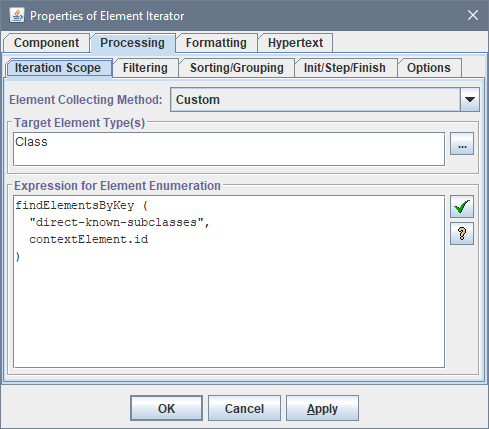
- Target Element Type(s)
-
Specify one or many element types (
TargetETs), which the elements included in the generated EIS must comply with. - Expression for Element Enumeration
-
A FlexQuery expression that should return an enumeration of elements,
which may be produced from the
iterator's
context element passed to the expression as the
generator context element
(accessible via the
contextElementproperty).The expression should return the
Enumerationtype. The returned enumeration should contain objects ofGOMElementorDSMElementtypes (objects of other types will be ignored).The
nullvalue returned by the expression will be interpreted as empty enumeration.
On the other hand, it is an equivalent of the usage of formula-axis
in a single Location Rule: * → { expr }::TargetETs
3. Filtering
Element Iterator provides two methods to filter the Element Iteration Scope (EIS): Both methods can be used simultaneously. However, since in general these operations are not commutative, the Filtering By Key is always done the first.Filtering By Key
The idea of this filtering is the following. Each element is associated with a certain key produced from that element. The result (filtered) enumeration will contain only those elements, whose keys are unique. The elements from the original enumeration, whose keys are repeating, will be deleted.That primary concept of filtering by key can be extended to a more complex case. It takes into account that those elements from the source enumeration, which produce the same filtering key, may belong also to a certain “protected” group so that all such elements must get into the result enumeration anyway. That is, filtering by keys within the same group must be suppressed. Such groups, in turn, are defined by yet another group key equally calculated for each element. When group keys are the same, the elements belong to the same group.
Precisely, this type of filtering works as follows:- All elements from the source enumeration are iterated.
- For each element, the filtering and group keys are generated by the FlexQueries specified in “Expression for Unique Key” and “Expression for Group Key”. The element is associated with those keys.
- Using a special hashmap, the filtering key is checked if an equal filtering key has been already produced on one of the previous iterations. If not, the element is added to the result enumeration queue and the iterations proceed to the next source element.
- If such a filtering key has been already generated, a corresponding element in the result queue is checked if its group key is the same as the current element's group key. When that's the case, the current element is appended to the group associated with that already queued element (with the same filtering/group keys).
-
If the group keys are different and the “Preference Condition” specified,
it is executed against the current element.
If the condition returns
true, the queued element associated with the same filtering key is deleted from the result enumeration queue. The associated with it group of other elements accumulated on previous iterations is also deleted. The current element is added to the result enumeration queue. Otherwise, the iterations just proceed to the next source element. - When all source elements have been iterated, the result enumeration is produced from consequent elements in the queue. At that, when an element has a group associated with it, all elements from that group will be added to the result enumeration immediately after that element. Thereby, the elements in the result enumeration may be ordered somewhat differently as in the source one – the elements with the same filtering/group keys will get grouped together.
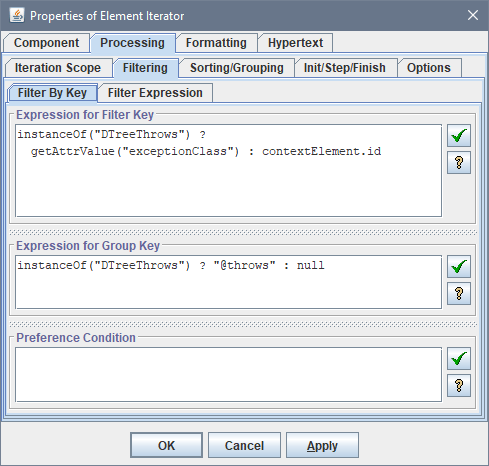
- Expression for Unique Key
-
Specify a FlexQuery that will be execute for each initial element to generate the element's filtering key.
The element is passed to the query as the generator context element. The value returned by the query should be an object good to be a hash key. The
nullvalue is also allowed.When you need to filter elements by several keys with different types so that only the whole set of keys generated for each element must be unique, you can do it by creating a single compound filtering key using
HashKey()function. - Expression for Group Key
-
Specify a FlexQuery that will be execute for each source element to generate its group key.
The element is passed to the query as the generator context element.
Notes:-
The value returned by the query should be an object good to be a hash key.
If the group key must consist of several keys with different types, you can make it using
HashKey()function. -
If for some element, the returned group key is
null, no grouping for that element will be taken into account. Such an element will be considered to form its own unique group. - When the expression for group key is not specified, no grouping will be taken into account.
-
The value returned by the query should be an object good to be a hash key.
If the group key must consist of several keys with different types, you can make it using
- Preference Condition
-
Specify a boolean FlexQuery that calculates the “Preference Condition” for the element.
When specified, this query will be executed for each initial element whose key is repeating (that is, when there was an early processed element with the same key). The element is passed to the query as the generator context element.
If the query returns
true, the old element will be replaced with the current element in the result enumeration.If the preference condition is not specified or returns
false, the current element with the repeating key will be filtered out (removed from the result enumeration).Conversely, specifying in this field only
"true"(which will be also a valid expression) will have an effect that for all initial elements associated with the same key only the last of them will appear in the result enumeration.
Filtering By Expression
This is what a normal filtering typically is. You specify a condition calculated for every initially collected element. Only those elements that comply with the condition are included in the result Element Iteration Scope (EIS).
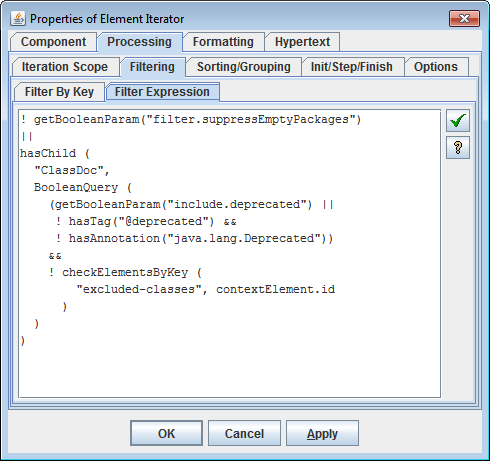
- Filter Expression
-
Specify a boolean FlexQuery that will be processed against each initial element.
If the query returns
true, the element is included in the result enumeration. Otherwise, it will be skipped over.The tested element is passed to the query as the generator context element.
4. Sorting
Sorting Modes
There are following options to specify sorting of the Element Iteration Scope (EIS):- none (original order)
- reverse original order
- by element attribute
- by element name
- by element value
- by location path
- by key expression
- by compound key
none (original order)
- No sorting. The EIS is remained in the original order (i.e. the one that is naturally formed when the elements are being inserted in the EIS).
reverse original order
- Reverses the original order. This option may be particularly useful when the EIS is generated by Sequence method.
by element attribute
-

The elements of the EIS are sorted by the value of the specified attribute (according to its data type).
Additional settings:
- ordering: ascending/descending
- case sensitive (for character values only)
by element name
-

The elements of the EIS are sorted by their names (i.e. the names of their Element Types) in lexicographical order. This option makes sense when the EIS contains many elements of the different types.
Additional settings:
- ordering: ascending/descending
- case sensitive (for character values only)
by element value
-
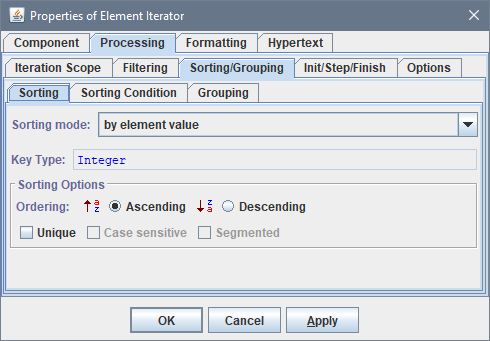
The elements of the EIS are sorted by their values (regarding data types)
Additional settings:
- ordering: ascending/descending
- case sensitive (for character values only)
by location path
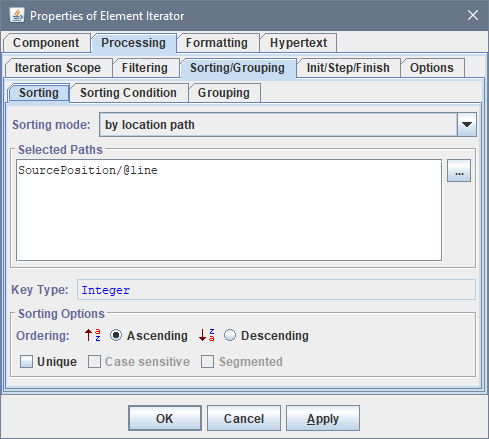
by key expression
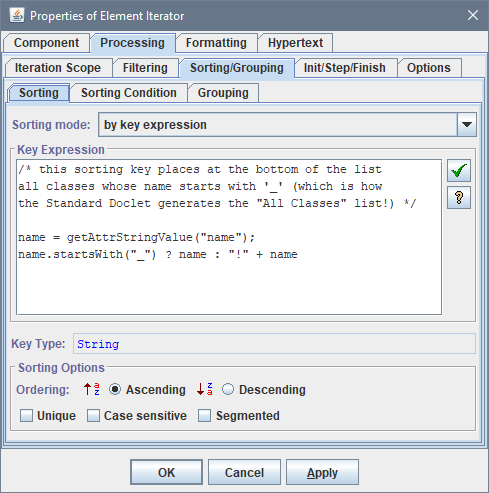
by compound key
-
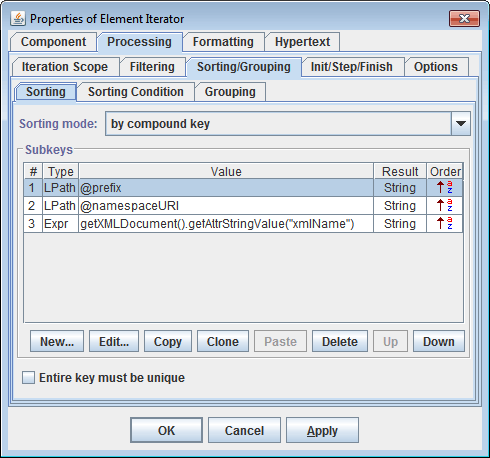
This is the most general method of sorting the EIS. It includes all previous methods and allows much more, though it might seem a little complicated. In this case, the elements of the EIS are sorted by an arbitrary compound key generated for each element.
Each compound key consists of a certain sequence of the subkeys:
-
subkey1; subkey2; ...; subkeyN
Each subkey has its own method of calculation. This method also determines the subkey's data type, according to which the corresponding subkeys are compared.
The subkey calculation method can be specified as one of the following:
-
by Location Path
The value of the subkey is assigned from the value of an element or attribute retrieved by the specified Location Path. The Location Path is interpreted relatively to the EIS element for which the whole key is generated. The Location Path also determines the subkey's data type.
-
by Formula
The value of the subkey is calculated by the specified FlexQuery-expression, which also determines the subkey's data type. The expression should derive the subkey value from the EIS element for which the whole key is generated. For doing so, the element is temporarily made the generator's context element and in this way can be accessed from within the expression.
- subkey ordering: ascending/descending
- case sensitivity (for character subkeys only)
-
Sorting Condition
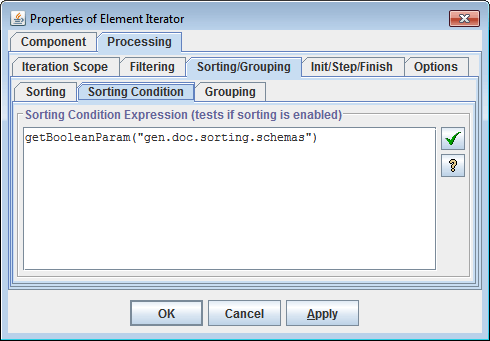
Sometimes it is needed to switch off any sorting specified in the Element Iterator and let elements follow in their original order, as they have been produced.For instance, this can be requested via settings of some template parameters.
This is controlled by the “Sorting Condition” – a boolean FlexQuery. When specified, it is calculated each time before sorting starts. When the query returnsfalse, no sorting is done.
5. Grouping
Using “Expression for Grouping Key” setting of the Element Iterator, you can break the iterated elements into groups so that to iterate first by the groups, and then by the elements within each group.
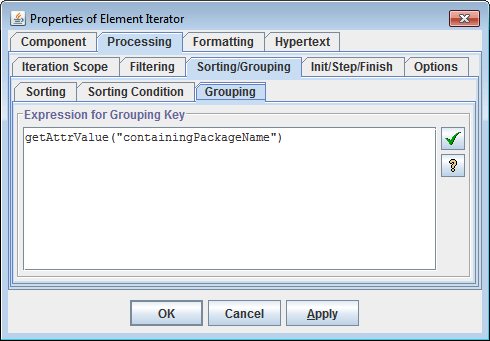
After the initial elements have been collected, filtered and sorted, the result sequence of elements is broken into groups according to the grouping keys generated for each element by the FlexQuery specified in the “Expression for Grouping Key” of the Element Iterator.
Each continuous subsequence of elements with equal grouping keys produces a group. As a result, the sequence of elements prepared for iterations is converted into a sequence of element groups. The ordering of elements in each group remains the same as in the initial sequence.
Since groups are not elements, the
Element Iterator
cannot iterate by them directly.
So, it will iterate by the first elements taken from each group.
However, at that, on each iteration step, the
'iterator.groupElements' property will be updated so as
to provide the enumeration of all elements in the given group.
This allows you to specify a nested iterator that will iterate by the elements in the group.
In the simplest case, the iteration scope of the nested Element Iterator should be specified as custom with the following Expression for Element Enumeration:
-
parentIterator.groupElements
'GOMIterator.groupElements' property are also available.
Notes:
- The grouping keys slice the prepared sequence of elements into groups. But what groups are created is determined by the ordering of the elements in the initial sequence. So, grouping should be defined along with sorting!
-
During processing of a group, the
'GOMIterator.groupElements'property returns a new element enumeration (i.e. a newjava.util.Enumerationobject) each time it is accessed. But, the elements contained in the enumeration will be the same. This allows you to specify several nested sibling Element Iterators (within the same parent one) to iterate the elements of the same group in different ways.